Posted on

Public Services Malta – VCARDS

Just for your convenience
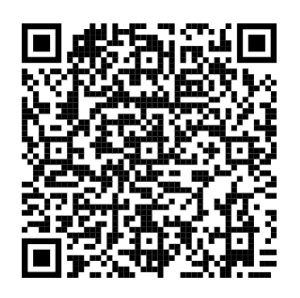
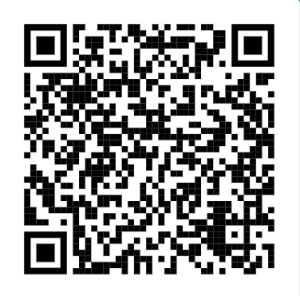
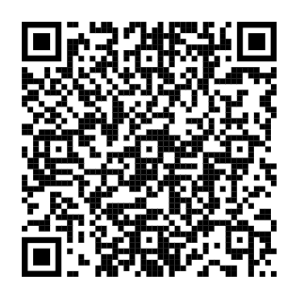
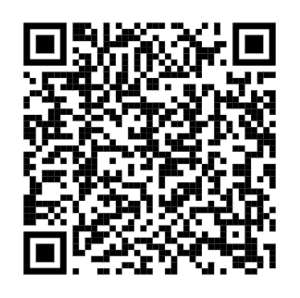
.. to easily import into your phone, should you need them.

The source of the information comes from the Malta Department of Information.

Malta Services contact list

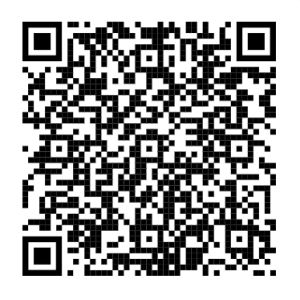
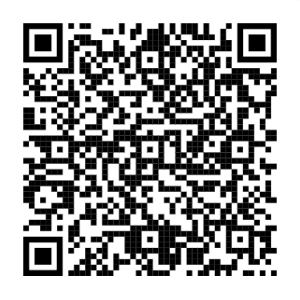
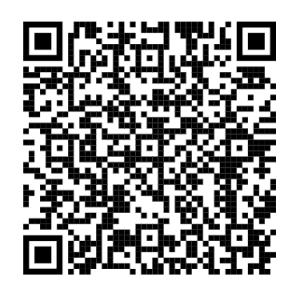
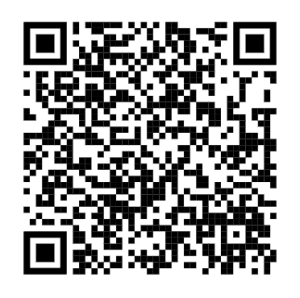
Service Phone number VCARD – Scan to import the contacts to your phone.
Malta Emergency services (all of EU) 112 This can not be imported as it is a
protected number, already on your phone.

Malta Telemedicine Helpline

The free telemedicine helpline service, accessible by dialling 1400, is available to people aged between 16 – 69. It is intended to ease pressure on emergency services by guiding patients to the most appropriate level of care based on their symptoms.

The helpline is meant to be used directly by patients. It targets those who are unsure whether their condition constitutes an emergency.

Patients deemed not to require emergency treatment at Mater Dei will be directed to private hospitals such as Da Vinci, St Thomas or St James’ or to local health centres.

1400 Malta Telemedicine Helpline - 1400

Malta Doctor online
(Not for emergencies!)

Do you feel you need a house visit by a doctor?

A doctor will ask relevant medical questions and decide whether a home visit from the nearest Health Centre is needed.

2122 2444 Malta Doctor online (Not for emergencies!) - 2122 444

Malta Support line

Free 24/7 support line for social, emotional, and crisis situations is 179.
It provides confidential assistance for issues including domestic violence, child abuse, mental health struggles, loneliness, and addiction.

179

Malta Support line - 179

Malta National Mental Health helpline

The 1579 Mental Health Helpline is a 24hr national telephone helpline, providing immediate and free emotional support, advice and practical guidance for anyone in need.
A number of Psychology Professionals, all working within Mental Health Services have undergone training geared towards preparing them to man the Helpline. They work on shifts in order to keep the service going on a 24/7 basis.

1579 Malta National Mental Health helpline - 1579

Malta National support line for victims of crime

The 116006 number is the National Support Line for victims of crime in Malta, operated by the Victim Support Agency (VSA). It provides free, confidential assistance including emotional support, legal guidance, and court case updates from 7:30 am to 7:30 pm, Monday to Sunday, including public holidays. 

116 006 Malta National support line for victims of crime - 116 006

Malta national poisons centre

The Malta National Poisons Centre, reachable by dialing 1774provides immediate, expert advice for toxic exposures and overdoses. The helpline operates daily from 08:00 to 20:00, including weekends and public holidays. For emergencies outside these hours, visit a local health centre or the Emergency Department at Mater Dei or Gozo General Hospital. 

1774 Malta national poisons centre - 1774

Malta Servizz.gov

Malta general information about government services


153 Malta Servizz.gov - 153
Malta DIER for Employees
(Department for Industrial and Employment relations)
1575 Malta DIER for Employees - 1575
Malta DIER for Employers
(Department for Industrial and Employment relations)
1576 Malta DIER for Employers - 1576

Malta LESA – Collissions

If you are in a road collission. 
Avoid for front to bumper, where the front to bumper form should be used. 

2132 0202 LESA Collissions - 2132 0202


Posted on

Writing a CV?

So, you are writing a CV?

.. and you want it to look good, be easily readable and well-received?

As someone who has read many CV’s, I know what I would like to see and what I really don’t like, and I believe this is commonly shared with many recruiters and hiring managers.
For example, the EuroPass CV format is frowned upon by almost anyone recruiting, so please stay away from these, as it is long, often unsrtuctured CV’s where you have to read multiple pages to get an idea of the skills of the person, their experience and history. Also, unless you are a graphics designer, don’t go overboard with being creative – keep it clean and easily readable, but be free to stick a personal design touch to the header or the side of the page, but keep the reading area clean.

The readability is really important, giving the recipient an easy way to assess the important information quickly, and it is also very important that the information is grouped and organized well.
This, as the recruiters has limited time to look at your CV, and you have one chance to make it through that first screening. The very job of your CV, is to get you past that first hurdle – landing you that interview.
The CV, is your personal representative in this first stage, and it has to be just as neat, clean and well-dressed as you would have to be when going for the interview.

Also, please do remember to keep your CV updated at regular intervals!

This gets us to the base rules of a good CV:

Page 1 – About half a page, which is the cover letter, containing a short summary of your strengths, highlights, character and visions.
Please note that this cover letter is not always required, and if not, exclude it from the CV. Just keep it ready and up to date for if/when it’s needed. It also serves as an example of your ability to express yoruself in free text.

Page 2 – A single page containing your contact details and personal info, skills and a summary work history and other summary details.

Page 3 and forward, is the extended work history, starting with most recent. Here, you get to explain the highlights, work and responsibilities in more detail for each job. Let the title be the work period (y-m to y-m), position and company. 

  • Always spellcheck the CV.
  • Keep your social media work timelines correct and in line with the CV – They will likely be crosschecked.

What about using AI like ChatGPT, Gemini and others in CV’s?

A few words of caution is in place here.
If you DO use AI, please rewrite what was suggested in your own words, as overly hyped and polished resume language instead of naturally flowing language can be seen as a red flag.

Employers’ perspectives on using ChatGPT to assist with your resume may vary; some may appreciate that you’re embracing new technology, while others might wonder if you lack the basic skills needed to do the job, and you relying on the AI to be able to do it?

Do companies check your resume for AI?

Yes, many companies do check resumes for AI-generated content. They use Applicant Tracking Systems (ATS) to scan for specific keywords and flag generic language while hiring managers look for inconsistencies and overly polished phrases. It’s essential to review and customize your AI-assisted resume to ensure it accurately reflects your experience and skills.

Avoid the “buzzword bingo!”

While it is perfectly expected and even wanted that you name relevant skills, technologies and similar things by their proper names, please do avoid making it a  “buzzword bingo” by overly including cliche’s such as: “team player” , “organizational skills”, “detail oriented”, “hard-working”, “passion for”, “results-focused”, “fast-paced movement/environment”, “quick learner” and so on.
Keep the language as factual as you can, keep it short, but do express what you did, and what you have achieved.

Buzzword cramming a CV is a good way to get it rejected, as the cv stops making sense and it all just becomes a pile of words/phrases stacked upon each other.

Having said this, the occasional use, where it is warranted and proper, is absolutely fine, especially if you can show a sample of that quick learning of a new skill that solved the issue.

Download the free [ CV-Template ] (docx format)

Feel free to use / modify as you wish!
Good luck in your job hunt!


Posted on

Auto-update your Go?

So you want to keep your golang up to date at all times?


Add this to  /bin/go-update, and stick it in your crontab as a daily job, and you will always be up to date.
Rework as needed for your favourite Linux/os distro..

#!/bin/bash
cd /tmp
CVERSION="$(curl -s https://go.dev/VERSION?m=text | grep -o 'go[0-9.]*')"
wget "https://go.dev/dl/${CVERSION}.linux-amd64.tar.gz"
rm -rf /usr/local/go
tar -C /usr/local -xzf "${CVERSION}.linux-amd64.tar.gz"
rm "${CVERSION}.linux-amd64.tar.gz"
go version

Njoy!!

Posted on

Crontab cheat sheet

For all the Linux admins out there – Add this to the header of all your crontabs.
… and it becomes a lot clearer to anyone reading them…

# *   *   *   *   *      command_to_be_executed
# -   -   -   -   -
# |   |   |   |   |
# |   |   |   |   +----- day of the week (0 - 6) (Sunday=0)
# |   |   |   +--------- month (1 - 12)
# |   |   +------------- day of the month (1 - 31)
# |   +----------------- hour (0 - 23)
# +--------------------- min (0 - 59)
#
# Asterisk    (*)  any value
# Comma       (,)  value list separator (0,20,30,45)
# Dash        (-)  range of values (8-17)
# Slash       (/)  steps values (*/20)
#
# @reboot     Run once, at startup
# @yearly     Run once a year,       "0 0 1 1 *"
# @annually   Same as @yearly
# @monthly    Run once a month,      "0 0 1 * *"
# @weekly     Run once a week,       "0 0 * * 0"
# @daily      Run once a day,        "0 0 * * *"
# @hourly     Run once an hour,      "0 * * * *"

Njoy!

Posted on

Tinypng script

Using the service from https://tinypng.com makes it easy to mass-shrink your PNG images to more palatable sizes, and it comes with a neat 500 free use transcodes per month, and it’s quite cheap after that.

Here’s a little script to help you with the work a bit.

Prerequisites:
bash, jq and curl.

Save the file as “tinify” and do a chmod 755 tinify

Flags:
-k <key> = API key for tinypng.com – can be omitted if specified in the environment variable by export TINIFY_API ="<api_key>"
-f <file> = Filename to compress
-r = Replace the original file with the compressed file. If not specified, the output file will be named tiny-<filename>
-v = verbose output
-s = Show compression statistics (1 line per file)

#!/bin/env bash
# (C) EmberLabs / Chris Sprucefield 2023.
# License: CC BY.

key=''
file=''
r_flag=false
v_flag=false
s_flag=false
s_arg="-s"

if [ "${TINIFY_API}" != "" ]
then
    if [ "${v_flag}" == true ] ; then echo "Using API key from env." ; fi
    key="${TINIFY_API}"
fi

while getopts 'rk:f:vsh?' flag; do
case "${flag}" in
    r) r_flag=true ;;
    k) key="${OPTARG}" ;;
    f) file="${OPTARG}" ;;
    v) v_flag=true
       s_arg="" ;;
    s) s_flag=true ;;
    *)
        echo "<cmd> -? | -h This help text"
        echo " -r Replace the original file with tinified file."
        echo " -k <apikey> The API key for tinify (or from \$TINIFY_API environment variable if set)"
        echo " -f <filename> The filename to encode (and replace if -r is specified)"
        echo " -v Verbose output"
        echo " -s Show compression statistics"
        exit 1
        ;;
    esac
done

if [ "${v_flag}" == true ] ; then echo "Processing ${file}" ; fi
JSON="$(curl ${s_arg} --user "api:${key}" --data-binary "@${file}" -i https://api.tinify.com/shrink | tail -1)"
URL="$(echo "${JSON}" | jq '.output.url' | sed 's/\"//g')"
ISIZE="$(echo "${JSON}" | jq '.input.size')"
OSIZE="$(echo "${JSON}" | jq '.output.size')"
RATIO="$(echo "${JSON}" | jq '.output.ratio')"
W="$(echo "${JSON}" | jq '.output.width')"
H="$(echo "${JSON}" | jq '.output.height')"

if [ "${ISIZE}" == "${OSIZE}" ]
then
    if [ "${v_flag}" == true ] ; then echo "No compression on ${file} - skipped." ; fi
    exit 0
fi

if [ "${URL}" != "null" ]
then
    if [ "${v_flag}" == true ] ; then echo "Fetching ${URL}" ; fi
    curl ${s_arg} "${URL}" -o "tiny-${file}"

    if [ "${r_flag}" == true ]
    then
        if [ "${v_flag}" == true ] ; then echo "Replacing original file" ; fi
        mv -f "tiny-${file}" "${file}"
    fi
    if [ "${s_flag}" == true ]
    then
        printf "%-40s %5d x %-5d In: %8d Out: %8d Ratio: %2.5f\n" "${file}" "${W}" "${H}" "${ISIZE}" "${OSIZE}" "${RATIO}"
    fi
else
    echo "Invalid response. (incorrect API key?)"
    exit 1
fi