
Posted on

EU AI Act

Introductory guidance to the EU AThoughts of the Fractional ChiefI Act,
formally Regulation (EU) 2024/1689.

  • A regulation applies directly across the EU, unlike
    a directive which normally needs national transposition.
  • It entered into force on 1 August 2024,
    with obligations phased in over time.
  • Not all parts has been put into full enforcement as of yet,
    but will be phased in.
    See the timeline further down. 

Disclaimer: 
Please note that this does not constitute legal advice, but only serves as a general guidance to the current state of the EU AI Act As a quick introduction as to do’s and don’ts for most situations. Specific legal advice must be sought individuall where applicable and especially so where it is flagged as a “risky practice”. 

Timeline:

Date What comes into force
Already in force: 2 February 2025 Bans on prohibited AI practices, plus AI literacy duties
Already in force: 2 August 2025 General-purpose AI model obligations, AI Office/governance provisions, penalties framework
Main 2026 step: 2 August 2026 Most of the AI Act starts applying, including many high-risk AI obligations, transparency rules, notified-body rules, market-surveillance rules, and deployer/provider obligations

High-risk AI systems, particularly Annex III areas such as employment, education, access to essential services, law enforcement, migration, justice and democratic processes.
Transparency duties, such as disclosure around AI interaction and AI-generated or manipulated content.
Provider and deployer duties, including documentation, risk controls, logs, human oversight, monitoring and correct use.
Market surveillance and enforcement machinery becoming much more relevant in practice.
Penalty exposure becoming more concrete across a wider set of breaches.

Later: 2 August 2027 Full roll-out under the original timetable, including some high-risk AI systems linked to regulated products

For 2026 planning, treat 2 August 2026 as the main compliance deadline unless your lawyer confirms that your specific AI category is covered by a formally adopted extension.

For an R&D/software business, prioritise before August:

  • Inventory all AI systems.
  • Classify each one: prohibited, high-risk, transparency-only, GPAI-based, or low-risk.
  • Identify whether you are a provider, deployer, importer, distributor, or product manufacturer.
  • For anything touching hiring, scoring, biometrics, education, safety, credit, insurance, public services or legal decision support, assume it may be high-risk until checked.
  • Put documentation, logging, human oversight, data governance and user disclosure in place.

The final “everything is fully live” date is not this year. It is currently 2 August 2027, subject to the newer extension proposals as may happen. 

Core idea

The Act regulates AI by risk category:

Category Meaning Status
Prohibited AI Uses considered unacceptable Banned
High-risk AI AI used in sensitive areas such as safety, employment, education,
law enforcement, critical infrastructure, migration, credit, essential services
Allowed, but heavily regulated
Transparency-risk AI Chatbots, deepfakes, emotion recognition,
biometric categorisation in some cases
Allowed with disclosure duties
General-purpose AI models Foundation models, including LLMs Allowed with provider obligations
Low/minimal risk AI Most ordinary AI tools Mostly unregulated by the Act

What is not allowed

The main banned uses include:

Prohibited practice Plain-English meaning
Manipulative or deceptive AI causing harm AI that materially distorts people’s behaviour in harmful ways
Exploiting vulnerabilities Targeting children, disabled people, elderly people, or economically/socially vulnerable groups in harmful ways
Social scoring Public or private scoring of people leading to unjustified or disproportionate treatment
Predictive policing based mainly on profiling Predicting criminal risk from personality traits or profiling alone
Untargeted scraping of facial images Building facial recognition databases by scraping CCTV or the internet
Emotion recognition in workplace or education Generally banned, except narrow safety or medical cases
Biometric categorisation of sensitive traits Inferring things like race, political opinions, religion, trade union membership, sex life or sexual orientation
Real-time remote biometric identification in public by law enforcement Generally banned, with narrow exceptions requiring safeguards

These prohibited-practice rules have applied since 2 February 2025.

What is allowed but regulated

High-risk AI is allowed, but you need a compliance system around it. Common high-risk areas include:

Area Examples
Employment CV screening, hiring, promotion, termination recommendations
Education Exam scoring, admission ranking, learner assessment
Essential services Credit scoring, insurance eligibility, public benefits
Critical infrastructure Safety-related AI for energy, transport, water, telecoms
Law enforcement Risk assessment, evidence analysis, crime analytics
Migration and border control Visa, asylum, border-risk assessment
Justice and democracy Tools assisting courts, legal interpretation, election influence

The Act also treats some AI as high-risk if it is a safety component of a regulated product, for example machinery, medical devices, vehicles, aviation or other CE-marked safety products.

Must do: high-risk AI

If you provide or place a high-risk AI system on the EU market, the main duties are:

Duty Meaning
Risk management Identify, assess and reduce foreseeable risks
Data governance Training, validation and testing data must be suitable, representative and checked for bias where relevant
Technical documentation Keep evidence showing how the system works and complies
Logging System must produce logs sufficient for traceability
Transparency to deployers Users must receive clear instructions, limits, accuracy info and intended use
Human oversight Humans must be able to monitor and intervene appropriately
Accuracy, robustness and cybersecurity System must meet declared performance and security standards
Conformity assessment Compliance must be checked before market placement
CE marking and EU database registration Required for many high-risk systems
Post-market monitoring Watch performance after deployment and report serious incidents

The broad high-risk obligations are scheduled to apply from 2 August 2026, although some product-related high-risk rules phase in later.

Must do: deployers/users of high-risk AI

If you are not building the AI but using it professionally, you still have duties. Typical deployer duties include:

Duty Meaning
Use it according to instructions Do not use the system outside its intended scope
Human oversight Assign competent people to supervise it
Input data control Ensure input data is relevant and suitable
Monitor operation Stop or escalate if risks or malfunction appear
Keep logs Preserve logs where under your control
Inform workers Tell employees or representatives where high-risk AI is used at work
Fundamental rights assessment Required in some public-sector and sensitive deployments

Transparency rules

Some AI systems must disclose themselves even if they are not high-risk.

You generally need to tell people when they are:

Situation Requirement
Interacting with a chatbot or AI assistant Disclose that it is AI, unless obvious
Seeing deepfake or synthetic content Mark or disclose it as artificially generated or manipulated
Exposed to emotion recognition or biometric categorisation Inform affected people, where allowed
Publishing AI-generated text on public-interest matters Disclose AI generation unless there was human editorial control

General-purpose AI and LLMs

For foundation models and LLMs, the Act regulates the model provider, not only the final app.

General-purpose AI model providers must generally:

Duty Meaning
Keep technical documentation Document model capabilities, limits, training process at a suitable level
Provide information to downstream providers So others can comply when building apps on top
Respect EU copyright rules Including policies for copyright compliance
Publish training-content summaries A sufficiently detailed summary of training data/content sources
Extra duties for systemic-risk models Testing, risk assessment, incident reporting, cybersecurity and model evaluation

GPAI obligations started applying from 2 August 2025, with some transitional treatment for older models.

Must not do

For practical compliance, avoid these:

Do not Why
Deploy AI in hiring, firing, credit, education or safety without classification These often fall into high-risk
Use AI to infer sensitive traits Often prohibited or heavily restricted
Scrape faces from the internet or CCTV for recognition databases Prohibited
Use workplace emotion recognition Generally prohibited
Hide that users are speaking to AI Transparency breach
Publish deepfakes without disclosure Transparency breach
Put high-risk AI on the EU market without documentation and conformity checks Core compliance failure
Assume “we are outside the EU” avoids the Act It can apply where AI output is used in the EU or the system is placed on the EU market

Penalties

The fines are substantial:

Breach Maximum fine
Prohibited AI practices Up to €35 million or 7% of worldwide annual turnover
Other major AI Act breaches Up to €15 million or 3%
Supplying incorrect or
misleading information
Up to €7.5 million or 1%

The Act uses the higher of the fixed amount or percentage, with adjusted treatment for SMEs/startups in some cases.

Quick business checklist

For a product or internal tool, I would check this order:

  1. Is it actually an AI system under the Act?
  2. Is any use prohibited?
  3. Is it high-risk under Annex I or Annex III?
  4. Does it interact with people, generate content, or produce deepfakes?
  5. Is it based on a GPAI/foundation model?
  6. Are you the provider, deployer, importer, distributor, or product manufacturer?
  7. What evidence do you need: risk file, data checks, logs, human oversight, documentation, instructions, monitoring?

For most normal software teams, the biggest danger zones are

  • Employment tools,
  • User scoring,
  • Automated eligibility decisions,
  • Biometric features,
  • Safety-related systems,
  • Education,
  • Finance,
  • Public-sector tools,
  • … and anything that manipulates or profiles people.

What if I am not in the EU? 

Let’s say you’re in the US or UK. The rules would potential still apply. 

  • If you are offering the service into the EU, dealing with EU users, or the AI system’s output is being used in the EU, then you should assume the EU AI Act may apply and check the position properly.
  • If the service and offering are strictly [nation]-only, with [nation] customers and [nation] use only, then it most likely would not apply.
  • The important distinction is that it is not just where the company is based.
    It is also where the AI system is placed on the market, where it is used, and where its outputs are used.

As always, and if in any doubt, please obtain legal reference. 


Posted on

DASH

Thoughts of the Fractional Chief

Ok… I’m guilty. I made it. Mea culpa, or… ?

Yes, it is another acronym. But this one is deliberately simple.
DASH is the way we approach practical, time-boxed work inside a business:
diagnose the issue, align on the fix, solve it, and hand it over working.

That is why it matters for PE-backed businesses.

Most teams do not need another workshop or strategy deck, but they need someone close enough to the business to find a real problem,
fix it, and leave behind something measurable.

DASH is a simple 30-day (or shorter) delivery model for portfolio companies that need practical work done quickly.

It stands for:

  • Diagnose – understand the real issue(s)
  • Align – agree on a practical solution
  • Solve – solve the problem
  • Handover – ship it and leave it working.

No need for big programmes, workshop theatre, slide decks, lost time,
never-ending meetings, costly pre-studies, or fat reports.
Just diagnose the problem, align so everyone knows what is expected and what the
outcome should look like, solve it, then hand over a sustainable working solution.

DASH is its own execution mode.

It is not a replacement for agile, waterfall, roadmaps, or normal planned delivery.
Those are still the right places for larger bodies of work, grouped initiatives,
platform changes, and long-running programmes.

DASH is for the single issue that needs direct intervention.

One problem.
One focused team.
One measurable outcome.
One handover.

That is the difference.

Key notes on execution:

  • Do not bring more people into each stage than needed. DASH is meant to be lean and rapid,
    providing the shortest practical path from start to finish.  

  • DASH follows a standard delivery flow:
    Requirements → Specification/scoping → Intent → Implementation → QA → Deployment,

    Requirements and specification/scoping sit inside Diagnose.
    Intent maps to Align – agree with stakeholders on what and how, lock out scope creep.
    Implementation and QA sit inside Solve.
    Deployment becomes Handover.

  • DASH does not necessarily follow agile methods. It can, where that helps, but the point is
    to solve specific issues quickly and efficiently, with focused effort from the people involved.

    Think of it as a task force: linear, practical, and moving from start to finish.   

… and it’s not just for tech. It works in any setting:

1. In Sales & Marketing

  • Diagnose: Customer acquisition cost (CAC) is spiking because leads are rotting in the pipeline for 5 days before anyone calls them.

  • Align: Agree with the VP of Sales and CMO that any lead not called within 15 minutes gets auto-routed to a dedicated “speed-to-lead” rep.

  • Solve: Build the automated routing rules in the CRM and write the instant-response scripts.

  • Handover: Go live, train the reps, and show the PE firm a drop in lead response time by Day 30.

2. In Finance / RevOps

  • Diagnose: The portfolio company is leaking cash because they have dozens of orphaned, duplicate software subscriptions across 5 departments.

  • Align: Agree with the CFO on a strict “one tool per function” policy and an immediate budget freeze on unapproved SaaS.

  • Solve: Audit the bank statements, cancel the redundant licenses, and renegotiate contracts with the core vendors.

  • Handover: Hand the CFO a clean, consolidated tech stack and a ledger showing $15,000 in monthly recurring savings.

3. In Supply Chain & Operations

  • Diagnose: E-commerce order fulfillment is backed up because the warehouse layout forces packing staff to walk twice as far as they need to.

  • Align: Agree with the Warehouse Manager on a new “high-velocity zone” layout for the top 20% best-selling items.

  • Solve: Spend a weekend physically moving the inventory, updating the bin locations in the system, and taping out the new floor paths.

  • Handover: Ship the new workflow live and measure the 25% increase in daily order throughput.

4. In HR & Talent

  • Diagnose: The company is losing top engineering candidates because the interview process takes 6 weeks and 7 rounds of interviews.

  • Align: Agree with the hiring managers to compress the process into 3 rounds over a maximum of 5 business days.

  • Solve: Rewrite the interview rubrics, block out standard evaluation times on managers’ calendars, and automate the scheduling links.

  • Handover: Roll it out for the next active job opening and watch the candidate drop-out rate plunge.

5. In Technology / Engineering

  • Diagnose: The application’s checkout page has a massive bounce rate because the page takes 4.5 seconds to load, causing users to abandon their carts.

  • Align: Agree with the Product Manager and Lead Architect that optimizing the heavy database queries and compressing the product images is the fastest way to get load times under 1.5 seconds.

  • Solve: Rewrite the inefficient SQL queries, implement a caching layer, and set up automated image compression in the deployment pipeline.

  • Handover: Deploy the code to production, monitor the server logs to prove the 3-second speed increase, and hand over the dashboard to the infrastructure team.


Posted on

Unicorn job specs…

Thoughts of the Fractional Chief

The rocky edition is at the bottom of the post!

Unicorn job specs are getting more and more common, where unreasonable demands such as:
You can’t be more than 20, you need an MBA or a computer science degree with 15 years experience in a professional setting, and you also need to match our corporate tech stack perfectly, as if you were a previous employee, which you, by the way, can’t be, Never mind understanding and matching our corporate culture (that you have never seen or experienced)… 

Then hearing leaders and recruiters complain about “there’s no candidates” after AI matching and removing any candidate that doesn’t fit these job specs, which almost guarantees 100% removal of any viable person. 

I wonder why that is. 

In practical reality, there is a few things that really matters.
If you see someone matching the basics, has the basic fundamental knowledge and seems to be the possible match, have a quick 10-minute call with them and figure out the rest, because that quick call will tell you who they are, their attitude and a bit of their pesonality.

Use the pre-scanning to sort out the chaff from the wheats, as in those applied, but do not have the industry experience or basic capabilities versus those who actually has it, because not everything is listed in the CV, but only told through their voice. 

When hiring, you are NOT looking for a replacement of someone you never had, impossible combinations or someone to replace your previous employee.
What you are REALLY looking for, is a person that can solve problems, not just in a a specific tech stack, but genericly, one that can bring new fresh ideas, expand your business, their adapability, their general ability to solve problems and come up with new ideas, and most importantly, the right attitude, as this is the one thing that bridges them all and can work wonders, where the wrong one… 

Anything else, is unicorn dreams.

There is no real shortage of people, just an extreme abundance of bad recruitment and unrealistic demands for combinations in job specs, that does not exist in real life.

The ones who looks beyond, is the ones who lands the good people. 

Lyrics: 

Unicorn Job Spec

Verse 1
Recruiter’s got a clipboard,
And a sparkle in their eye,
“Must be twenty, senior-level,
With a decade on the sly.”
They want startup grit and corporate polish,
MBA and code,
Five frameworks, three dead languages,
And “good vibes” on the road.

Pre-Chorus
They say, “We just need culture fit,”
Which sounds suspiciously like,
“Can you read our minds by Tuesday
And pretend you own a bike?”

Chorus
Stop chasing unicorns, darling,
They’re not hiding in the stack,
You want fifteen years’ experience
On a baby’s lower back.
Perfect match, exact same tooling,
Never needs to be shown,
But the real ones learn, adapt, solve fast,
And don’t cry when left alone.

Verse 2
The CV says “GoLang, Docker,”
But the job says “also React,”
Then Kubernetes, sales support,
And “light finance” as a fact.
“Must thrive under pressure,”
“Must be humble, must be keen,”
Translation: “We are chaos
In a Patagonia fleece.”

Pre-Chorus
You can scan a hundred résumés,
And still not spot the spark,
But a ten-minute intro call
Can light the bloody dark.

Chorus
Stop chasing unicorns, darling,
They’re not grazing by your desk,
You want plug-and-play perfection
With a halo and no stress.
Perfect match, same stack, same habits,
Same weird office tea,
But give me grit, a brain, some humour,
And the nerve to disagree.

Bridge
There’s no talent shortage,
Just a fantasy buffet,
Where every job spec’s drunk at midnight
Writing filth in HR grey.
“Rockstar ninja wizard wanted,”
With compliance and a smile,
Paying junior money proudly,
For a full-stack demigod profile.

Final Chorus
Stop chasing unicorns, darling,
Put the fairy dust away,
Skills can grow and stacks can change,
But attitude will stay.
You can’t hire perfect from a keyword,
You can’t filter out the soul,
So pick the ones who learn, solve, laugh,
And drag the mess towards the goal.

Outro
So here’s to the awkward intro call,
The CV that undersells,
The clever sod with no buzzwords,
Who can fix your burning hells.
The unicorn is fiction,
The job spec needs a drink,
Hire humans, not hallucinations,
And maybe learn to think.


Posted on

Public Services Malta – VCARDS

Just for your convenience
.. to easily import into your phone, should you need them.

The source of the information comes from the Malta Department of Information.

Malta Services contact list

Service Phone number VCARD – Scan to import the contacts to your phone.
Malta Emergency services (all of EU) 112 This can not be imported as it is a
protected number, already on your phone.

Malta Telemedicine Helpline

The free telemedicine helpline service, accessible by dialling 1400, is available to people aged between 16 – 69. It is intended to ease pressure on emergency services by guiding patients to the most appropriate level of care based on their symptoms.

The helpline is meant to be used directly by patients. It targets those who are unsure whether their condition constitutes an emergency.

Patients deemed not to require emergency treatment at Mater Dei will be directed to private hospitals such as Da Vinci, St Thomas or St James’ or to local health centres.

1400 Malta Telemedicine Helpline - 1400

Malta Doctor online
(Not for emergencies!)

Do you feel you need a house visit by a doctor?

A doctor will ask relevant medical questions and decide whether a home visit from the nearest Health Centre is needed.

2122 2444 Malta Doctor online (Not for emergencies!) - 2122 444

Malta Support line

Free 24/7 support line for social, emotional, and crisis situations is 179.
It provides confidential assistance for issues including domestic violence, child abuse, mental health struggles, loneliness, and addiction.

179

Malta Support line - 179

Malta National Mental Health helpline

The 1579 Mental Health Helpline is a 24hr national telephone helpline, providing immediate and free emotional support, advice and practical guidance for anyone in need.
A number of Psychology Professionals, all working within Mental Health Services have undergone training geared towards preparing them to man the Helpline. They work on shifts in order to keep the service going on a 24/7 basis.

1579 Malta National Mental Health helpline - 1579

Malta National support line for victims of crime

The 116006 number is the National Support Line for victims of crime in Malta, operated by the Victim Support Agency (VSA). It provides free, confidential assistance including emotional support, legal guidance, and court case updates from 7:30 am to 7:30 pm, Monday to Sunday, including public holidays. 

116 006 Malta National support line for victims of crime - 116 006

Malta national poisons centre

The Malta National Poisons Centre, reachable by dialing 1774provides immediate, expert advice for toxic exposures and overdoses. The helpline operates daily from 08:00 to 20:00, including weekends and public holidays. For emergencies outside these hours, visit a local health centre or the Emergency Department at Mater Dei or Gozo General Hospital. 

1774 Malta national poisons centre - 1774

Malta Servizz.gov

Malta general information about government services


153 Malta Servizz.gov - 153
Malta DIER for Employees
(Department for Industrial and Employment relations)
1575 Malta DIER for Employees - 1575
Malta DIER for Employers
(Department for Industrial and Employment relations)
1576 Malta DIER for Employers - 1576

Malta LESA – Collissions

If you are in a road collission. 
Avoid for front to bumper, where the front to bumper form should be used. 

2132 0202 LESA Collissions - 2132 0202


Posted on

Linux wins?

I could not have said this any better myself, as to why there is a silent shift happening.

A few years ago there was a case of Linux having maybe 1 to 1.5% of the desktop,
at best, and right now we’re looking at somewhere between 6 and 7% percent of the
desktop market, depending on where you look, and growing. 

Even in the gaming sector…

This, all of a seemingly sudden after all these years, and it’s rapidly increasing, mainly at the cost of Microsoft, with users moving from Windows to Linux and MAC, and the main reason being mainly due to what is being forced upon the users, the lack of freedoms, the intrusiveness as well as the sudden changes to UI and things that used to work, no longer being there etc.

People want control, ownership, access to THEIR data, privacy, things working consistently without forced sudden changes.

Posted on

Infosec – Time for a New Class of “DevSec”?

Thoughts of the Fractional Chief
TL;DR
Most companies leave a gap between development and security. Developers move fast, and infosec steps in too late, when issues are already hard and expensive to fix.
A new role—DevSec—fills that middle space. DevSec catches insecure patterns early, filters noisy alerts, guides developers with simple and practical advice, and prevents small mistakes from becoming real vulnerabilities. It’s not a replacement for dev or infosec, but a missing function that keeps products safer, reduces rework, and helps teams move faster with fewer surprises.


2025-12 – By Chris Sprucefield.

Most companies still separate development and security into two distant groups. Developers build features, ship code, and keep things going. Infosec teams respond to alerts, run scans and write long lists of issues that often arrive too late in the development cycle to fix without disruption.

This split leaves a gap in the middle.

In the meanwhile, nobody is watching the small decisions and habits that create security risks long before anyone notices them. By the time a formal security review happens, the code has settled and dependencies have grown. The system has become harder to change, and at that point, problems are expensive, frustrating, and often pushed aside because deadlines are tight.

We need a role that fills this gap.

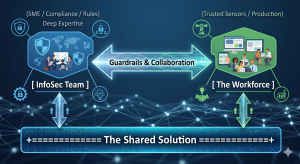
For now, I’ll call it DevSec—not an existing title, but a new class of function designed to sit between development and traditional infosec, focused on preventing problems before they turn into incidents or audits.


What DevSec Is (and Isn’t)

  • DevSec is not a developer who happens to care about security.
  • DevSec is not an infosec analyst who steps in after the fact.
  • DevSec is not a pipeline engineer building scanners or automations.

Instead, DevSec is a practical, hands-on generalist who understands enough about code and coding in general, and enough about security to evaluate risks as they appear and is reported by supporting tools or reviews, not months later. They don’t need deep, specialized expertise in every system, but they need the ability to look at a piece of code or an alert and decide:

  • Is this threat real, or is it noise?
  • Could this pattern cause trouble later if not fixed?
  • Does this issue affect our actual product or environment?
  • What is the simplest fix?
  • … and how do we prevent it from recurring?

The point is not to replace security teams or developers. The point is to augment and support devs at an early stage, prevent avoidable work and avoidable failures by catching issues early – when they are still easy to fix.


Why This Role Matters

1. Developers aren’t meant to be full-time security analysts

Most development teams already deal with tight timelines. Handing them a long list of scanner warnings only slows them down. They need someone who filters out the noise and highlights the few things that truly require attention.

2. Traditional security looks at problems too late

Security teams often depend on completed features, logs, or external scans. They step in only after code is written, patterns are set, and risky habits have already spread through the codebase. Furthermore, traditional infosec teams does often does not have the budget for this, and are they are typically ill-equipped to review code or being very hands-on, as their primary focus is typically on process, procedure and higher level systematic security. 

3. The space in between is where most vulnerabilities are born

Unsafe defaults, repeated shortcuts, overly permissive functions, straight AI copy and paste issues, SQL injections and many other common bad or lazy practices, and forgotten test logic – these are the seeds of future incidents, and they form quietly in day-to-day development, especially when the pressure to deliver is high, or perhaps, the development team is young. 

A DevSec function sees these before they harden into real vulnerabilities.


What DevSec Actually Does

Here’s what this role focuses on:

  • Reviewing code for insecure patterns without requiring full developer depth.
  • Triaging alerts from automated tools to identify what matters and what doesn’t.
  • Spotting bad practices early and nudging the teams to correct them.
  • Explaining risks in simple, practical and actionable terms.
  • Offering targeted suggestions for fixing problems now and avoiding them later.
  • Keeping the security posture aligned with how the product actually works.

This is early-stage, practical prevention—not bureaucracy, not policy writing, and not firefighting.


The Benefit to the Whole Team

With DevSec in place:

  • Developers get fewer false alarms and clearer guidance.
  • Security teams receive fewer late-stage surprises.
  • Risk is primarily handled at the point of creation instead of after release.
  • Bad habits are corrected early, reducing long-term maintenance pain.
  • The product becomes naturally more secure without slowing down delivery.
  • When there are external threats, Developers will get help to determine the focus for fixes.

This helps companies avoid the familiar cycle of security issues suddenly piling up right before an audit, or surfacing only after customers report something unexpected.

A nice side-effect is that it is highly likely to save money for the company by less late-stage costly fixes and revisits (time that can be spent on developing products), all while delivering a safer product, which in turn will improve the goodwill and market reputation among it’s customers.


Why DevSec Is Needed Now

Many companies are now building faster, integrating third-party tools constantly, and relying heavily on automated systems. The pace of change means small missteps compound quickly. Traditional security functions can’t keep up with that pace if they’re only brought in late. Developers can’t shoulder responsibility for everything either—they’re not equipped, and it’s not realistic.

Classic Infosec teams primary focus is on the bigger picture, processes and procedures, and while very good at what they do, they are typically not very hands-on. 

The midpoint has been empty for too long.

A dedicated DevSec role fills that gap and brings steady, ongoing security awareness into the daily rhythm of development, without overwhelming anyone.

This isn’t about introducing another layer of process. It’s about putting someone in the spot where issues actually appear—right where code is written, habits form, and risks begin.

DevSec is the missing piece that makes that possible.


(C) (BY) EmberLabs® & Chris Sprucefield

Posted on

Handling gaps in Your CV as a contractor or self-employed professional

TL;DR:
Register a trading name (and TM), use it as your employer on your CV, describe your roles, and treat clients as projects, not jobs.
This provides a seamless, professional timeline—no gaps, and full legitimacy.

The longer reasoned version…
If you are looking for a new position, gaps in your CV can raise questions, especially if you work as a contractor or are self-employed.

Here’s a practical approach, that can solve these issues, and provide a solid timeline.

  1. Register a Trading Name:
    Even as a sole trader, register a trading name for your business. In most countries, this is inexpensive and can also be registered as a trademark (™), giving your business added credibility. Just choose the trading name you want to work with, and typically, within EU, a national registration is ~100 euro.
    This also gives you a VERY strong legal protection for your trading name, and you can prevent others from using it in your class.
    It is even stronger protection than registering a busines name with the companies house…
    Also, register this as a “wordmark” for maximum protection, as this enables you to incorporate the name in any graphical setting, as otherwise, a trademark would be linked and limited to the specific graphical representation that has been registered, as a wordmark allows you to use it in ANY graphical, logo or font setting, as it is the “word” itself that is protected, not how it is represented.

  2. Trade Under Your Registered Name:
    Conduct all your business activity using your trading name.
    Use this name consistently on all invoices, contracts, and professional correspondence.

  3. Present Your Trading Name as Your Employer:
    On your CV, list your trading name (and TM, if registered) as your employer.
    Your self-employment under your own company or trading name is a perfectly valid and legal form of employment, and way of representing yourself on the market.

  4. List Roles, Not Clients:
    Instead of listing each client as a separate employer, describe your roles and responsibilities under your trading name, and optionally mention key clients or projects as examples.
    This creates a single, continuous timeline of employment and avoids unexplained gaps.

Example:

Period Employer Role Details
2015–Present ACME Consulting™ Owner/Consultant Provided IT consulting to various clients…
[list of clients, and summary types of work / roles for the clients]

The benefits?

  • Ensures a consistent work history with no unexplained gaps.

  • Enhances professional image with a registered TM.

  • Allows you to maintain confidentiality about clients if needed.

  • Factually correct: Self-employment under a trading name is a legal form of employment.

  • Common practice: Many experienced contractors use this method to avoid the appearance of gaps.

  • Protects client confidentiality and avoids cluttering the CV with short stints.

  • Removes bias – Employers often hesitate if they see gaps or too many short contracts; this format presents stable, ongoing work.

Possible caveats?

  • Some HR may request clarification about what you did for that period—be ready with a project/client list if asked.
    Any non-client periods, can be explained as self-investment in training, working on internal products and otherwise.

  • In some industries (e.g., government, finance), disclosure of clients may still be required at later stages.
    This is technically not a problem, and you would have the invoicing and other items to show, as well as self-investment as cover for gaps.

Good luck!

Posted on

Another step on the road.

I got the A1-A3 and A2 drone license.
(and I’m not stopping there…)
Got around to doing the second part, going for the A2, and if you are thinking of getting your drone training and license, take a look here:
https://www.dronelicense.eu/

Very good and effective training material, allowing you to work at your own pace, and most importantly,
get there, and get properly licensed across EU.

  • It’s formal,
  • It’s real,
  • It’s official.
  • It’s valid across all of EU.
    (please note that you will need to register as a pilot in at least one EU country, and some require individual national registrations)

Ok, ok… so what are the rules?!

You can effectively sum it up as:

  • A1: fly over people but not over assemblies of people
  • A2: fly close to people
  • A3: fly far from people (heavyweight drones are limiting this)

This is a EASA (European Aviation Safety Agency) summary of drone classes and rules. 

EASA information:
https://www.easa.europa.eu/en/domains/drones-air-mobility/operating-drone/open-category-low-risk-civil-drones

Posted on

Contractor vs Employee?

Consultants/Contractors vs Employee – A side by side comparison

Which one? Or both?
A seemingly never-ending and long-standing dilemma for many decision-makers and businesses is whether to use employees or consultants/contractors (hereafter, contractors).

When choosing between contractors and employees, it’s a common perception that contractors are for short-term and employees are for long-term commitments, and contractors are very expensive, but this does not generally hold true as of today.

In either case, one needs to consider real factors like flexibility, cost-effectiveness, and specialized expertise. Contractors offer targeted skills ideal for equally short-term specific projects without long-term commitments, or general long-term commitments and continuity, if properly managed by the provider, while employees has the ability to bring continuity and deeper integration into your organization’s culture. It is all down to what your priorities and goals are.

Shifting preferences. 
Also, in today’s world, the sentiment of many highly skilled and professional workers have shifted a lot as of recent years, with them becoming contractors rather than employeers, and being a contractor have become a new common form of employment, offering a greater flexibility as seen to the business side of things, and one that can equally come to become a longer term part of the business with an equal level of commitment, if done right.

The longevity of commitment claim is especially at stake here, as it is today common for employees to change jobs in the range of every two to four years, sometimes more often, negating the long-term engagement claim, and price-wise, there is not much of a realistic difference between the two anymore. 

The net result of this, speaks in favor of the contractor, not just purely from the business perspective.

Side by side:
Take a look at these two quick summaries, side-by-side examples on comparable levels: 

Contractor/Consultant
Contractor: 550/day over 44 weeks.

No additional costs of:

  • Paid holidays
  • Sick leave
  • Employer NI
  • Pension match
  • Bonuses
  • Training

Benefits (their selling points)

  • Flexibility
  • Preserved continuity by well-managed service provision
  • Pre-defined documented skills and knowledge
  • Little to no onboarding costs/time.
  • Only paid for days working
  • Break clauses based on work
    or project requirements.
Employee
Permanent employee: 75K salary over 44 weeks.

Additional costs to consider:

  • Employers NI  ~10%-15% (7,500 – 11,250)
  • Pension match  ~5% (750)
  • Bonus ~10% on average (7,500)
  • Recruitment fee ~15-20% (11,250 – 15,000)
  • Statutory 20 days PTO (or more)
  • Statutory sickness leave (up to ~15 days)

Other types of common costs (benefits) include (estimates per year):

  • Private Medical/Dental Insurance,
    €500 – €3,000
  • Voucher Schemes, €500-€2,500
  • Employee Wellbeing Programs,
    €100 – €1,000+.
  • Away Days, Parties, and Events,
    €50 – €500+ per-event. (3/y)
  • Equipment and Tech Costs, €500 – €2,000

Office space average cost across EU p/a and employee: €7500 (range: 3.9-15k/y)
This includes rent, maintenance, supplies. 

Total: 550/day for 44 weeks – €121K  Total Year 1: €121 – €148K (€134.5k)
Total Year 2+: €108 – €135k (€121.5k)

Today, and so far in this comparison, it is pretty much like-for-like, cost-wise, but with added benefits for both parties, but it does not stop there. 

The contractor, in greater self-governance, albeit at somewhat greater risks and contractual committments, and for the business, it’s a more well-defined commitment with a known entity and lesser set of risks in cases of non-performance and similar issues. 

The hidden costs:
Additionally, there are likely considerable company overheads in HR, Legal, and compliance due to the costs required to maintain employee records, manage disputes management, conduct reviews, provide training, and many other functions. These are commonly not required for contractors, due to their contractual self-governance.

It doesn’t stop there,  as for the staff, the business usually has other overheads not covered in the above, such as parking, office space, heating, energy, office supplies and additional factors that needs to be added to the costs of the employee, which for the contractor is mainly or wholly covered by themselves at their own expense. The cost of this has been summarized above as a range, and is based on 15sqm/employee and year, as an average across EU, for both cowork and outright rented spaces. 

As for the longevity and company culture, the relatively small cost of including contractors to company events, parties, etc, will be greatly outweighed by the benefits, and still be a tax-deductible, as it is  now supplier entertainment. One just needs to be careful about the anti-bribery regulations. 

As you can see, after the first year, contractors and employees are on par or cheaper, without the loss of productivity or protection for your business, and in the end, with all things considered, it is a win-win situation for both parties, business and contractor, offering the greater flexibility.

Summary: 
If you take all of the hidden business overheads as listed above into account, you will likely soon see that the contractor is actually the cheaper option overall, with the same or greater business benefits.
The primary question now comes down to:

  • Are you willing to have consultants and allow them to work remotely? 
  • Are you willing to trust the people you hired to work for you, to do their job? 

If the answer is yes, then, you have just widened your recruitment basis and access to qualified staff. 

Posted on

Writing a CV?

So, you are writing a CV?

.. and you want it to look good, be easily readable and well-received?

As someone who has read many CV’s, I know what I would like to see and what I really don’t like, and I believe this is commonly shared with many recruiters and hiring managers.
For example, the EuroPass CV format is frowned upon by almost anyone recruiting, so please stay away from these, as it is long, often unsrtuctured CV’s where you have to read multiple pages to get an idea of the skills of the person, their experience and history. Also, unless you are a graphics designer, don’t go overboard with being creative – keep it clean and easily readable, but be free to stick a personal design touch to the header or the side of the page, but keep the reading area clean.

The readability is really important, giving the recipient an easy way to assess the important information quickly, and it is also very important that the information is grouped and organized well.
This, as the recruiters has limited time to look at your CV, and you have one chance to make it through that first screening. The very job of your CV, is to get you past that first hurdle – landing you that interview.
The CV, is your personal representative in this first stage, and it has to be just as neat, clean and well-dressed as you would have to be when going for the interview.

Also, please do remember to keep your CV updated at regular intervals!

This gets us to the base rules of a good CV:

Page 1 – About half a page, which is the cover letter, containing a short summary of your strengths, highlights, character and visions.
Please note that this cover letter is not always required, and if not, exclude it from the CV. Just keep it ready and up to date for if/when it’s needed. It also serves as an example of your ability to express yoruself in free text.

Page 2 – A single page containing your contact details and personal info, skills and a summary work history and other summary details.

Page 3 and forward, is the extended work history, starting with most recent. Here, you get to explain the highlights, work and responsibilities in more detail for each job. Let the title be the work period (y-m to y-m), position and company. 

  • Always spellcheck the CV.
  • Keep your social media work timelines correct and in line with the CV – They will likely be crosschecked.

What about using AI like ChatGPT, Gemini and others in CV’s?

A few words of caution is in place here.
If you DO use AI, please rewrite what was suggested in your own words, as overly hyped and polished resume language instead of naturally flowing language can be seen as a red flag.

Employers’ perspectives on using ChatGPT to assist with your resume may vary; some may appreciate that you’re embracing new technology, while others might wonder if you lack the basic skills needed to do the job, and you relying on the AI to be able to do it?

Do companies check your resume for AI?

Yes, many companies do check resumes for AI-generated content. They use Applicant Tracking Systems (ATS) to scan for specific keywords and flag generic language while hiring managers look for inconsistencies and overly polished phrases. It’s essential to review and customize your AI-assisted resume to ensure it accurately reflects your experience and skills.

Avoid the “buzzword bingo!”

While it is perfectly expected and even wanted that you name relevant skills, technologies and similar things by their proper names, please do avoid making it a  “buzzword bingo” by overly including cliche’s such as: “team player” , “organizational skills”, “detail oriented”, “hard-working”, “passion for”, “results-focused”, “fast-paced movement/environment”, “quick learner” and so on.
Keep the language as factual as you can, keep it short, but do express what you did, and what you have achieved.

Buzzword cramming a CV is a good way to get it rejected, as the cv stops making sense and it all just becomes a pile of words/phrases stacked upon each other.

Having said this, the occasional use, where it is warranted and proper, is absolutely fine, especially if you can show a sample of that quick learning of a new skill that solved the issue.

Download the free [ CV-Template ] (docx format)

Feel free to use / modify as you wish!
Good luck in your job hunt!