Posted on

The Death of the “Department of No”

Thoughts of the Fractional ChiefWhy the “Department of No” Is Dying
(And How to Build an Army of Trusted Sensors)

There is a quiet war raging inside modern enterprises, and it isn’t between your IT department and overseas hackers. It is between your Information Security (InfoSec) team and your own employees.

Consider a scenario playing out in corporate offices globally:
An organization deploys an aggressive new authentication policy on its corporate environment. To “maximize” security, the system demands re-authentication multiple times a day.
It doesn’t care if a user is actively typing – it abruptly forces a re-login
in the middle of a sentence, wiping out unsaved form data.

You say – this surely doesn’t happen?
Yet, I’ve seen it. In real life. 

Eventually, a high-performing employee simply stops using the system.

When a client asks, “Why aren’t you logging into the platform?” the worker provides an honest, devastating response:

“The security tools are so disruptive to production that it is impossible to do any work in them. If your system fails to recognize an active, ongoing session, that isn’t security—it’s a productivity tax and a fundamental design flaw.
Fix it.”

When a company’s strongest security controls actively throttle revenue generation, the security posture has failed.
Security should be a locked door, not a treadmill employees must sprint on while trying to type.

As a seasoned tech chief who has sat in both the business-growth and risk-management seats, I view this tension through a very pragmatic lens. True protection does not come from draconian restriction – It comes from:
Smart Security.

An approach built on economic deterrence, user enablement, and turning your workforce from perceived vulnerabilities into your most agile defense asset.

1. The Core Philosophy: Attacker Economics

Many security professionals treat corporate defense as a binary: You are either 100% secure or you are completely exposed, only that – this mindset is an executive failure. True security is an economic (and to some degree, a political) optimization problem.

The foundation of Smart Security rests on a simple formula: maximize the cost to the attacker until it exceeds the potential value of the targeted asset.

Smart security aims to make your organisation less profitable, less predictable, and less scalable to attack than the alternatives.

In simple plaintext; 
 

If a cybercriminal targets corporate data worth €10,000 on the dark web, your job is not to build a billion-euro fortress.
Your job is to architect a defensive barrier that costs the attacker €10,001 in resources, computing power, or time to breach.
The moment the math doesn’t track, the rational, financially motivated adversary moves on to an easier target – nobody in their sane minds spends €100 to get a return of €99.

The Nation-State Exception

There is, of course, a critical caveat to this economic rule – If your organization is targeted by a politically or ideologically motivated adversary, such as a state-sponsored Advanced Persistent Threat (APT) group, the ROI model breaks down as these actors possess virtually unlimited budgets and no requirement for financial return. 

If a nation-state actor is fully committed to breaching your network, they will likely find a way in,
practically no matter what.

In these rare, high-stakes environments, trying to prevent initial entry by torturing employees with constant MFA prompts is like using a cardboard shield against a railgun – Instead, the strategy must pivot from absolute prevention to resilience and blast-radius containment.
You design the architecture under the assumption of breach, ensuring the adversary cannot move laterally or cause catastrophic, existential damage. Make your staff your allies and educate on the how, why and when’s, and make it rewarding!

2. Security Friction Breeds “Shadow IT”

When an InfoSec team implements oppressive security controls, they do not actually increase the cost to the attacker – they merely increase the cost to the employee.
This is the classic mistake of confusing friction with security.

When you force an employee to navigate hostile user design, they do not stop needing to meet deadlines – Instead, they find workarounds. They copy-paste sensitive corporate data into unmanaged local text files to avoid losing work, they migrate projects to personal Dropbox folders or unsanctioned generative AI tools.

This is the birth of Shadow IT.

Traditional CISOs routinely blame the workforce for being reckless when these workarounds occur, but a strategic leader looks at Shadow IT and recognizes it as a structural security failure, not a personnel failure.
High friction forces good employees to make bad security decisions just to cope and do their jobs.

Smart Security focuses on reducing friction so that compliance automatically becomes the path of least resistance.

3. From the “Department of No” to Business Enablers

To eliminate Shadow IT and align the organization, InfoSec must undergo a cultural evolution. The legacy approach to security was bureaucratic and binary: Is this new software or workflow 100% risk-free? No? Then block it at the firewall.

A modern, strategic InfoSec function operates as a business enabler. Its default posture must shift from a flat “No” to a collaborative “Yes, and here is how we do it safely.”

Legacy “Department of No” The Smart Security Enabler
“You cannot use this external generative AI tool. It is completely blocked.” We see how this AI tool triples your output. Let’s route it through our private API wrapper so company data doesn’t leak into public training models.”

This shift does not mean InfoSec abdicates its governing duty or becomes a rubber stamp.
As executive leaders, the buck stops with us and InfoSec retains the absolute right, and the explicit duty to veto an initiative if the residual risk inherently exceeds the possible gains or violates the organization’s risk appetite.

They are the ultimate gatekeepers, and rightly so.

However, because a Smart Security team rarely issues a flat rejection, their veto carries immense corporate weight.
When they finally do say “No,” the business units do not push back or seek a workaround – they comply immediately because a solid foundation of trust and understanding of why, has been built.
The C-suite and the board will always back a CISO or InfoSec team that says, “We engineered three different architectural workarounds to make this project happen, but the inherent risk remains unacceptable.”

4. Turning the Workforce into “Trusted Sensors”

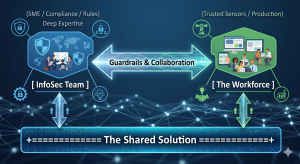
The ultimate goal of Smart Security is to build a high-functioning ecosystem that leverages distributed intelligence. By pairing the technical expertise of the security team with the operational context of the workforce, you create a powerful symbiosis.

InfoSec understands the threat landscape, regulations (ISO, NIST, SOC2, …), and system vulnerabilities. The users understand how the business actually functions, what clients require, and where the operational bottlenecks sit. When these two forces work in conjunction, they discover viable solutions that satisfy compliance while maintaining production velocity.

Crucially, this model transforms employees into trusted sensors and early detectors.
No automated Endpoint Detection and Response (EDR) software or AI-driven email filter is flawless.
The ultimate line of defense against sophisticated social engineering or a targeted Business Email Compromise (BEC) is a human who notices that something is “off.”

If an employee feels valued and supported by InfoSec, they will instantly flag a suspicious event, but if they operate in a culture of fear, resentment, or high friction, they will stay silent, or blindly click through authentication prompts just to clear their screens.

5. Gamifying the Culture: The InfoSec Challenger

How do you bring this philosophy to life?

You take security awareness out of the realm of boring, punitive, check-the-box compliance compliance training and turn it into a transparent, gamified corporate sport.

Instead of deploying trick phishing simulations designed to catch employees out and sentence them to mandatory training videos, flip the paradigm entirely – Challenge the workforce to catch the InfoSec team out.

By launching a monthly “IT InfoSec Challenger of the Month” initiative, you incentivize proactive vigilance through friendly competition:

  • The Scope: Staff members earn points and recognition for providing valuable security insights, flagging emerging industry threat vectors, identifying an operational vulnerability, or spotting a live configuration error in an internal corporate application, acting as a collaborative and willing extension to the InfoSec team.

  • The Rewards: The prizes do not need to be massive corporate cash payouts. In organizational psychology, status and micro-rewards drive higher engagement. A bottle of bubbly, a digital badge on the companywide corporate newsletter, a small desk trophy, or a dinner voucher for two with their plus-one creates highly coveted bragging rights and a personal reward with recognition that stays with them.

This framework creates a no-lose scenario for the enterprise. If staff members successfully catch a blind spot or process vulnerability, InfoSec wins because they can patch the flaw before a malicious actor exploits it.
If the staff fails to find a vulnerability but stays actively engaged trying to do so, InfoSec still wins because the baseline vigilance of the entire company skyrockets.

When a member of the accounting or operations team wins the award, security ceases to be an abstract corporate policy – It becomes a badge of honor celebrated among peers.

The Bottom Line

A business exists to generate value, serve its clients, and ship production.

The Infosec function exists to ensure the business survives to keep doing so, and if security throttles production to zero or just becomes the “No”,it fails its primary objective.

The core of leadership boils down to a simple mandate:
Allow people to do their jobs with minimum friction, and make it as safe as we possibly can.

By treating your workforce as trusted partners, designing workflows around human behavior, and gamifying vigilance, you dismantle the legacy friction that compromises modern enterprises, and you stop being seen as the enemy and disabler and instead, you become a core pillar of operational excellence and a practical partner.

That is part of how you build a resilient, secure, and highly profitable enterprise.


Posted on

EU AI Act

Introductory guidance to the EU AThoughts of the Fractional ChiefI Act,
formally Regulation (EU) 2024/1689.

  • A regulation applies directly across the EU, unlike
    a directive which normally needs national transposition.
  • It entered into force on 1 August 2024,
    with obligations phased in over time.
  • Not all parts has been put into full enforcement as of yet,
    but will be phased in.
    See the timeline further down. 

Disclaimer: 
Please note that this does not constitute legal advice, but only serves as a general guidance to the current state of the EU AI Act As a quick introduction as to do’s and don’ts for most situations. Specific legal advice must be sought individuall where applicable and especially so where it is flagged as a “risky practice”. 

Timeline:

Date What comes into force
Already in force: 2 February 2025 Bans on prohibited AI practices, plus AI literacy duties
Already in force: 2 August 2025 General-purpose AI model obligations, AI Office/governance provisions, penalties framework
Main 2026 step: 2 August 2026 Most of the AI Act starts applying, including many high-risk AI obligations, transparency rules, notified-body rules, market-surveillance rules, and deployer/provider obligations

High-risk AI systems, particularly Annex III areas such as employment, education, access to essential services, law enforcement, migration, justice and democratic processes.
Transparency duties, such as disclosure around AI interaction and AI-generated or manipulated content.
Provider and deployer duties, including documentation, risk controls, logs, human oversight, monitoring and correct use.
Market surveillance and enforcement machinery becoming much more relevant in practice.
Penalty exposure becoming more concrete across a wider set of breaches.

Later: 2 August 2027 Full roll-out under the original timetable, including some high-risk AI systems linked to regulated products

For 2026 planning, treat 2 August 2026 as the main compliance deadline unless your lawyer confirms that your specific AI category is covered by a formally adopted extension.

For an R&D/software business, prioritise before August:

  • Inventory all AI systems.
  • Classify each one: prohibited, high-risk, transparency-only, GPAI-based, or low-risk.
  • Identify whether you are a provider, deployer, importer, distributor, or product manufacturer.
  • For anything touching hiring, scoring, biometrics, education, safety, credit, insurance, public services or legal decision support, assume it may be high-risk until checked.
  • Put documentation, logging, human oversight, data governance and user disclosure in place.

The final “everything is fully live” date is not this year. It is currently 2 August 2027, subject to the newer extension proposals as may happen. 

Core idea

The Act regulates AI by risk category:

Category Meaning Status
Prohibited AI Uses considered unacceptable Banned
High-risk AI AI used in sensitive areas such as safety, employment, education,
law enforcement, critical infrastructure, migration, credit, essential services
Allowed, but heavily regulated
Transparency-risk AI Chatbots, deepfakes, emotion recognition,
biometric categorisation in some cases
Allowed with disclosure duties
General-purpose AI models Foundation models, including LLMs Allowed with provider obligations
Low/minimal risk AI Most ordinary AI tools Mostly unregulated by the Act

What is not allowed

The main banned uses include:

Prohibited practice Plain-English meaning
Manipulative or deceptive AI causing harm AI that materially distorts people’s behaviour in harmful ways
Exploiting vulnerabilities Targeting children, disabled people, elderly people, or economically/socially vulnerable groups in harmful ways
Social scoring Public or private scoring of people leading to unjustified or disproportionate treatment
Predictive policing based mainly on profiling Predicting criminal risk from personality traits or profiling alone
Untargeted scraping of facial images Building facial recognition databases by scraping CCTV or the internet
Emotion recognition in workplace or education Generally banned, except narrow safety or medical cases
Biometric categorisation of sensitive traits Inferring things like race, political opinions, religion, trade union membership, sex life or sexual orientation
Real-time remote biometric identification in public by law enforcement Generally banned, with narrow exceptions requiring safeguards

These prohibited-practice rules have applied since 2 February 2025.

What is allowed but regulated

High-risk AI is allowed, but you need a compliance system around it. Common high-risk areas include:

Area Examples
Employment CV screening, hiring, promotion, termination recommendations
Education Exam scoring, admission ranking, learner assessment
Essential services Credit scoring, insurance eligibility, public benefits
Critical infrastructure Safety-related AI for energy, transport, water, telecoms
Law enforcement Risk assessment, evidence analysis, crime analytics
Migration and border control Visa, asylum, border-risk assessment
Justice and democracy Tools assisting courts, legal interpretation, election influence

The Act also treats some AI as high-risk if it is a safety component of a regulated product, for example machinery, medical devices, vehicles, aviation or other CE-marked safety products.

Must do: high-risk AI

If you provide or place a high-risk AI system on the EU market, the main duties are:

Duty Meaning
Risk management Identify, assess and reduce foreseeable risks
Data governance Training, validation and testing data must be suitable, representative and checked for bias where relevant
Technical documentation Keep evidence showing how the system works and complies
Logging System must produce logs sufficient for traceability
Transparency to deployers Users must receive clear instructions, limits, accuracy info and intended use
Human oversight Humans must be able to monitor and intervene appropriately
Accuracy, robustness and cybersecurity System must meet declared performance and security standards
Conformity assessment Compliance must be checked before market placement
CE marking and EU database registration Required for many high-risk systems
Post-market monitoring Watch performance after deployment and report serious incidents

The broad high-risk obligations are scheduled to apply from 2 August 2026, although some product-related high-risk rules phase in later.

Must do: deployers/users of high-risk AI

If you are not building the AI but using it professionally, you still have duties. Typical deployer duties include:

Duty Meaning
Use it according to instructions Do not use the system outside its intended scope
Human oversight Assign competent people to supervise it
Input data control Ensure input data is relevant and suitable
Monitor operation Stop or escalate if risks or malfunction appear
Keep logs Preserve logs where under your control
Inform workers Tell employees or representatives where high-risk AI is used at work
Fundamental rights assessment Required in some public-sector and sensitive deployments

Transparency rules

Some AI systems must disclose themselves even if they are not high-risk.

You generally need to tell people when they are:

Situation Requirement
Interacting with a chatbot or AI assistant Disclose that it is AI, unless obvious
Seeing deepfake or synthetic content Mark or disclose it as artificially generated or manipulated
Exposed to emotion recognition or biometric categorisation Inform affected people, where allowed
Publishing AI-generated text on public-interest matters Disclose AI generation unless there was human editorial control

General-purpose AI and LLMs

For foundation models and LLMs, the Act regulates the model provider, not only the final app.

General-purpose AI model providers must generally:

Duty Meaning
Keep technical documentation Document model capabilities, limits, training process at a suitable level
Provide information to downstream providers So others can comply when building apps on top
Respect EU copyright rules Including policies for copyright compliance
Publish training-content summaries A sufficiently detailed summary of training data/content sources
Extra duties for systemic-risk models Testing, risk assessment, incident reporting, cybersecurity and model evaluation

GPAI obligations started applying from 2 August 2025, with some transitional treatment for older models.

Must not do

For practical compliance, avoid these:

Do not Why
Deploy AI in hiring, firing, credit, education or safety without classification These often fall into high-risk
Use AI to infer sensitive traits Often prohibited or heavily restricted
Scrape faces from the internet or CCTV for recognition databases Prohibited
Use workplace emotion recognition Generally prohibited
Hide that users are speaking to AI Transparency breach
Publish deepfakes without disclosure Transparency breach
Put high-risk AI on the EU market without documentation and conformity checks Core compliance failure
Assume “we are outside the EU” avoids the Act It can apply where AI output is used in the EU or the system is placed on the EU market

Penalties

The fines are substantial:

Breach Maximum fine
Prohibited AI practices Up to €35 million or 7% of worldwide annual turnover
Other major AI Act breaches Up to €15 million or 3%
Supplying incorrect or
misleading information
Up to €7.5 million or 1%

The Act uses the higher of the fixed amount or percentage, with adjusted treatment for SMEs/startups in some cases.

Quick business checklist

For a product or internal tool, I would check this order:

  1. Is it actually an AI system under the Act?
  2. Is any use prohibited?
  3. Is it high-risk under Annex I or Annex III?
  4. Does it interact with people, generate content, or produce deepfakes?
  5. Is it based on a GPAI/foundation model?
  6. Are you the provider, deployer, importer, distributor, or product manufacturer?
  7. What evidence do you need: risk file, data checks, logs, human oversight, documentation, instructions, monitoring?

For most normal software teams, the biggest danger zones are

  • Employment tools,
  • User scoring,
  • Automated eligibility decisions,
  • Biometric features,
  • Safety-related systems,
  • Education,
  • Finance,
  • Public-sector tools,
  • … and anything that manipulates or profiles people.

What if I am not in the EU? 

Let’s say you’re in the US or UK. The rules would potential still apply. 

  • If you are offering the service into the EU, dealing with EU users, or the AI system’s output is being used in the EU, then you should assume the EU AI Act may apply and check the position properly.
  • If the service and offering are strictly [nation]-only, with [nation] customers and [nation] use only, then it most likely would not apply.
  • The important distinction is that it is not just where the company is based.
    It is also where the AI system is placed on the market, where it is used, and where its outputs are used.

As always, and if in any doubt, please obtain legal reference. 


Posted on

DASH

Thoughts of the Fractional Chief

Ok… I’m guilty. I made it. Mea culpa, or… ?

Yes, it is another acronym. But this one is deliberately simple.
DASH is the way we approach practical, time-boxed work inside a business:
diagnose the issue, align on the fix, solve it, and hand it over working.

That is why it matters for PE-backed businesses.

Most teams do not need another workshop or strategy deck, but they need someone close enough to the business to find a real problem,
fix it, and leave behind something measurable.

DASH is a simple 30-day (or shorter) delivery model for portfolio companies that need practical work done quickly.

It stands for:

  • Diagnose – understand the real issue(s)
  • Align – agree on a practical solution
  • Solve – solve the problem
  • Handover – ship it and leave it working.

No need for big programmes, workshop theatre, slide decks, lost time,
never-ending meetings, costly pre-studies, or fat reports.
Just diagnose the problem, align so everyone knows what is expected and what the
outcome should look like, solve it, then hand over a sustainable working solution.

DASH is its own execution mode.

It is not a replacement for agile, waterfall, roadmaps, or normal planned delivery.
Those are still the right places for larger bodies of work, grouped initiatives,
platform changes, and long-running programmes.

DASH is for the single issue that needs direct intervention.

One problem.
One focused team.
One measurable outcome.
One handover.

That is the difference.

Key notes on execution:

  • Do not bring more people into each stage than needed. DASH is meant to be lean and rapid,
    providing the shortest practical path from start to finish.  

  • DASH follows a standard delivery flow:
    Requirements → Specification/scoping → Intent → Implementation → QA → Deployment,

    Requirements and specification/scoping sit inside Diagnose.
    Intent maps to Align – agree with stakeholders on what and how, lock out scope creep.
    Implementation and QA sit inside Solve.
    Deployment becomes Handover.

  • DASH does not necessarily follow agile methods. It can, where that helps, but the point is
    to solve specific issues quickly and efficiently, with focused effort from the people involved.

    Think of it as a task force: linear, practical, and moving from start to finish.   

… and it’s not just for tech. It works in any setting:

1. In Sales & Marketing

  • Diagnose: Customer acquisition cost (CAC) is spiking because leads are rotting in the pipeline for 5 days before anyone calls them.

  • Align: Agree with the VP of Sales and CMO that any lead not called within 15 minutes gets auto-routed to a dedicated “speed-to-lead” rep.

  • Solve: Build the automated routing rules in the CRM and write the instant-response scripts.

  • Handover: Go live, train the reps, and show the PE firm a drop in lead response time by Day 30.

2. In Finance / RevOps

  • Diagnose: The portfolio company is leaking cash because they have dozens of orphaned, duplicate software subscriptions across 5 departments.

  • Align: Agree with the CFO on a strict “one tool per function” policy and an immediate budget freeze on unapproved SaaS.

  • Solve: Audit the bank statements, cancel the redundant licenses, and renegotiate contracts with the core vendors.

  • Handover: Hand the CFO a clean, consolidated tech stack and a ledger showing $15,000 in monthly recurring savings.

3. In Supply Chain & Operations

  • Diagnose: E-commerce order fulfillment is backed up because the warehouse layout forces packing staff to walk twice as far as they need to.

  • Align: Agree with the Warehouse Manager on a new “high-velocity zone” layout for the top 20% best-selling items.

  • Solve: Spend a weekend physically moving the inventory, updating the bin locations in the system, and taping out the new floor paths.

  • Handover: Ship the new workflow live and measure the 25% increase in daily order throughput.

4. In HR & Talent

  • Diagnose: The company is losing top engineering candidates because the interview process takes 6 weeks and 7 rounds of interviews.

  • Align: Agree with the hiring managers to compress the process into 3 rounds over a maximum of 5 business days.

  • Solve: Rewrite the interview rubrics, block out standard evaluation times on managers’ calendars, and automate the scheduling links.

  • Handover: Roll it out for the next active job opening and watch the candidate drop-out rate plunge.

5. In Technology / Engineering

  • Diagnose: The application’s checkout page has a massive bounce rate because the page takes 4.5 seconds to load, causing users to abandon their carts.

  • Align: Agree with the Product Manager and Lead Architect that optimizing the heavy database queries and compressing the product images is the fastest way to get load times under 1.5 seconds.

  • Solve: Rewrite the inefficient SQL queries, implement a caching layer, and set up automated image compression in the deployment pipeline.

  • Handover: Deploy the code to production, monitor the server logs to prove the 3-second speed increase, and hand over the dashboard to the infrastructure team.


Posted on

AI – Hype or actually useful?

Thoughts of the Fractional ChiefTL;DR

Primarily from a tech view, there is a lot of talk today about AI,
and a lot of that talk is exagerrated hype, overconfidence and
sometimes outright false claims, especially by some companies
that claim AI can generate 100% error-free code and outperforms
regular devs by 1000x. 

Let’s be a bit more realistic about the expectations and possibilities.

What is an LLM? 

It’s in the name – LLM stands for Large Language Model.

An LLM is software trained on large amounts of human language and related content, that at its core, predicts the likely next token(s) (words or pieces of words) given the prompt and the context.
In most real deployments it is probabilistic, meaning that if you allow sampling, two identical questions can produce different answers, and if you force deterministic decoding, you can get consistent outputs, but most likely, an incorrect response.

LLMs learn statistical patterns from what they were trained on: questions and answers from the internet, books, documentation, scientific writing, and code.
They can produce novel combinations of ideas by generalizing across those patterns, and all while this is very useful, it also means they can generate convincing text that is wrong.

AI models also use something called quantization, and while this is a simplification and not the only cause of mistakes, it can be a contributing factor.

Quantization reduces numeric precision inside the model (for example in the weights and sometimes activations) to make the model smaller and faster to run.

Conceptually it is like rounding: 1.0001 and 1.0002 may become 1.0 after rounding.
That kind of approximation can increase error rates, especially on harder reasoning tasks or long chains of inference, because small inaccuracies can (and will) compound as the reasoning progresses over time, and this extends into other sources similiar in context to “quantization”. See list at the end of the article. 

That said, hallucinations are not caused only by quantization – they can occur even without it, because the model is optimized to produce plausible text, not guaranteed truth, as all LLMs are effectively – statistical models.

Please do not get me wrong – I’m all for the use of AI, but it has to be an informed and responsible use, without the notion that it is always right and error-free, that it can be let to do anything without proper vetting by humans and so on – which are just plain dangerous and seemingly all too common misconceptions out in the wild.

Knowing how to, and using it responsibly can bring tremendous benefits to pretty much any organization, remembering the keywords: “How to” and “responsibly”. 

Bottom line:
There is no LLM today whose output you should treat as guaranteed correct – you still need to apply common sense, knowledge, and verification to the response.

So, security and autonomous agents?

Security and autonomous agents should not be treated lightly.
If you combine high privilege access with an agent that can produce “plausible” but wrong decisions, you are taking on a very real and high risk.

There are already examples of organizations learning this the hard way.
Reporting in February 2026 described AWS incidents where an internal AI coding agent (Kiro) was involved in a 13 hour outage in December 2025 after deleting and recreating an environment, with Amazon attributing the root cause to misconfigured permissions and process failures rather than “the AI” alone.
Ref: Amazon’s AI deleted production. Then Amazon blamed the humans.

The lesson is simple: do not let an AI control production or security critical systems without strict constraints and prior human approvals combined with auditing.
If you use AI for anything that can affect production, vet it first.
If all it does is produce text, the risk is much lower, but if it can take (unmonitored) actions, the bar must be set much higher.

So then, what is it good for?  

Now you may think, so what can I use it for then? 

Now that you understand what it is, the practical uses become obvious – treat it like a smart collaborator you can use to offload lower level tasks:

  • writing a function or two
  • scaffolding
  • generating test modules
  • drafting documentation
  • summarizing tickets, logs, or discussions
  • try concepts and solutions
  • hunt down stubborn and hard to find bugs, given good input.

You still review and own the output, but you do not have to type everything.

It is a power tool. You can talk to it, reason with it, and use it to explore ideas.
You can use it to analyze how text is likely to be perceived by others.
You can use it to help hunt bugs and narrow down hypotheses if you provide solid context – It can save hours, or even days..

Fast research of complex questions can also work well: it can combine and condense large sets of information into something usable.
You just have to verify anything important, before you use it. 

The key to success is: bring a good specification. 
Be very precise about your functional requirements and the data models, with examples of the data and formats, and you will have a higher rate of success.
Also be equally precise about the do’s and don’ts, as this will set the borders for the AI to work with during the creation of what you want.   

In short, assume the worst and create a clear specification of what you do/don’t want with the limits and everything, as if the actor is an inexperienced human doing it for the first time. 

Ok, so, what are the practical limitations? 

… you ask. 

Because models can hallucinate and make mistakes, do not blindly copy-paste and run generated code, or other output, as if it is perfect.
Use it safely:

  • if the output is trivial, you may be able to validate it at a glance
  • otherwise, review it, test it, and treat it like a draft from a junior engineer or colleague. 

Also, the old adage still goes – garbage in – garbage out.
Vague prompts produce vague results, and this is true for humans too.
“I am hungry, bring me something to eat” can easily result in your least liked dish.
If you want useful output, give clear requirements and constraints.

Do not assume it will “just know” what you meant.

Architecture, mostly

For higher level architecture, be cautious.
Context windows are limited, and long projects exceed what the model can consistently hold in working memory.
That often leads to linear solutions, duplicated logic, and “works in isolation” code that becomes spaghetti when assembled into an application.

You can partially mitigate this, but it takes discipline:

  • provide tight specifications
  • use simple explicit constraints like “must”, “must not”, and “shall”, and keep the samples simple and short. 
  • force modular boundaries and interfaces
  • provide examples of required data models where possible. 
  • require tests and acceptance criteria

Agentic AI

Keep the rules simple: 

  • Never let agents freely control everything and make autonomous decisions on your behalf.
  • Be explicit about
    • what they can do,
    • what they cannot do,
    • and what requires a human approval step.

If in doubt, hard-limit the last 2 steps, by not giving them the interface to act. 
(access to credentials, chatbot groups for interchange (risk of cred/data leakage), or direct execution control.)

Additional reasons for hallucinations and limitations of AI models

Just like expressed before with the decimal quantization example, these are also limitations in terms of precision or similar limitations that add to the fact that models hallucinate. 
The limitations are in principle similar to the quantization, by limiting of precision in the sources or even removal of sources, conflicting data, too much simplification, short attention spans (forgetfulness) and so on as in the examples below: 

  • Objective mismatch: plausible vs true
    LLMs are trained to predict the next token that fits the context, not to prove statements are true.
    When the model is uncertain, it will often still produce something that sounds coherent.

  • Missing or ambiguous context
    If the prompt does not include key facts, constraints, or definitions, the model fills gaps with the most likely completion.
    That is where confident wrong details show up.

  • No built-in source of truth
    Unless the system is explicitly connected to retrieval (docs, database, search) and forced to use it, the model is relying on its internal patterns, which are not a reliable fact store.

  • Training data gaps and conflicts
    Training data contains errors, outdated info, and contradictions.
    The model can blend incompatible sources or pick a common but wrong pattern.

  • Overgeneralization from patterns
    LLMs are good at analogies. Sometimes they apply the right shaped pattern to the wrong situation and generate an answer that looks structurally correct but is factually incorrect.

  • Decoding settings and randomness
    Sampling settings (temperature, top-p, etc.) increase diversity but also increase risk of inventing details.
    Deterministic decoding reduces variance but can still be wrong, just consistently wrong.

  • Long context and attention limits
    With long prompts or multi-step tasks, important details can be missed, diluted, or overshadowed by more recent or more frequent cues. Errors then cascade.

  • Weak grounding in math and multi-step verification
    They can produce fluent reasoning text without actually checking intermediate steps.
    If a system does not force external checks (calculators, unit tests, compilers), they will sometimes “talk through” mistakes.

  • Quantization and smaller models (contributing factor)
    Lower precision and smaller models can degrade accuracy and increase error rates, but they are not the root cause.
    Full precision large models hallucinate too.


Posted on

Thoughts on software project sizes – or the pain of scaling.

Thoughts of the Fractional ChiefLines of Code aren’t a quality metric, but they are a cognitive one.

As a codebase grows, the limiting factor isn’t performance or tooling – it’s how much of the system a human can realistically hold in their head.

Past certain size thresholds, individual understanding gives way to structural knowledge, tooling reliance, and eventually team coordination, and this is where documentation, standards, and deliberate technical debt management stop being “nice to have” and become survival requirements.

Ignore this, and critical system knowledge quietly walks out the door one day – possibly for the last time.


While the mythical “LOC” is not an absolute in any way, it is still a usable measure to roughly estimate the complexity and size of a project and by this what you  may need or be able to do with the resources you have. 

The scale of an application, and as echoed by most programmers as a rough measure, is the amount of lines of code one can keep in their head effectively and how much of the “big picture” you start to lose as the code size increases.

This is what I have found to be rough guidelines over time, and while it is my personal perception and a lot of programmers tend to concur, but  may individually have their own varying standards:

  • Tiny – 1,000 lines or less.
    • “Trivial” or a single-problem solution like an individual automation.
    • Easy to keep every tiny detail and every line in your head and know exactly where it is.

  • Small – 1,000-5,000 lines.
    • You know the details of individual modules and functions and within a line range of where to locate a particular set of functionality with ease.
    • You still have deep knowledge of the bulk of the code.
  • Medium – 5,000 to 20,000 lines.
    • You as an individual start losing the detail.
    • You start to focus on the overall structure of the entire project in your head,
      and know roughly what module a particular function exists in and how far in to scroll to find it.
    • You’re only maintaining details of code you’re actively working at this point.
  • Large – 20,000 to 50,000 lines.
    • Detail knowledge is limited to immediate work and everything else is having a birds-eye sense of where stuff is in the code.
    • You’re working off high-level structural knowledge and will start using tools to pinpoint things you’ve forgotten the exact location for.
    • This tends to also be the mental threshold of where an experienced programmer can hold the picture of the entire codebase in their head.

  • Very Large – 50,000 to 250,000+ lines.
    • You’re at multiple team members at this point and you’re treating the codebase as a set of interlocked projects.
    • Coordination for changes is absolutely essential at this point.
    • Only a handful of developers could maintain a complete mental picture of the codebase at this point and would be deep specialists in it having worked on it for years.
    • If this is maintained by a smaller team, or worse, an individual, you need to ensure standards and proper handovers when (not if) people move jobs, where the maintaining experience and knowledge literally walks out of the door every night, and at some point, for the last time. 

Please keep in mind that:

  • These thresholds describe individual cognitive limits, not team or system limits, and that 100k LOC in one tangled domain/monolith is not the same as the same 100k LOC across cleanly separated domains such as that of miniservices (see the article about “when microservices go rogue”).

  • The numbers can be skewed upwards significantly by things like the following (in no specific order)

    • Good coding standards and principles. 
    • Good tools and IDE’s supporting the developers, such as the Jetbrains and similar toolchains.
    • Good specifications. (this is where you start…)
    • Good documentation (Sorry guys – no, code is NOT the documentation – it is the implementation – what you did..)
    • Documentation is what describes in simple terms, how things hang together, used data formats, connectivity, data and service relations, related services etc , and, the intent of what you did – not what you did.
    • Good processes supporting the development coupled with development time frames allowing for the above.
    • Continuously caring about technical debt, setting aside time “decruft” the bad stuff.

(C) (BY) EmberLabs / Chris Sprucefield

Posted on

When Microservices Go Rogue

Thoughts of the Fractional Chief

How “Nanoservices” Created 500+ Repos
… and why to small will cost you… 
TL;DR

Microservices can help teams move faster—until they explode into nanoservices: tiny, single-endpoint codebases scattered across hundreds of repositories with no boundaries, no cohesion, and no architectural sense. One service per path or method is not microservice architecture. It’s fragmentation.
The escape hatch is not returning to a monolith, nor is it doubling down on microservices. The answer is miniservices: A meaningful middle-path, based on domain-sized, cohesive components that are small enough to understand but large enough to contain meaningful behavior, and which can be split in a reasonable way, should there be a need. “Miniservices” restore control, reduce cognitive load, and prevent microservice spraw. 


1. The Accident Nobody Planned: Microservices Turning Into Nanoservices

This problem always begins with good intentions.

A team wants:

  • Autonomy
  • Scalability
  • Isolation
  • Independent deployment
  • Faster iteration

So they break the system into microservices.

But without boundaries, ownership, or domain thinking, teams quickly slide into:

“One endpoint = one service.”

Before long, the architecture contains:

  • 500+ Git repositories
  • Services with 50 lines of code
  • Duplicated logic (Copy – paste, no shared libraries)
  • Inconsistent conventions
  • Circular dependencies via HTTP
  • Non-stop CI/CD pipelines
  • No unified view of the system
  • No stable contracts
  • Dozens of small deployment failures per week
  • Extreme costs of Lambda functions or operation via containers, when taken to the extreme.

This is not distributed architecture – this is distributed confusion.


2. Why Nanoservices Form: The Root Causes

1. No shared definition of “microservice”

One team treats a microservice as a meaningful domain boundary.

Another treats it as “a new repo for every small piece of logic.”

2. Over-focus on independence

Teams think independence means “split everything” instead of “separate things that change for different reasons.”

3. Fear of merge conflicts or shared ownership

Avoiding coordination by dividing code endlessly is attractive—until everything depends on everything else.

4. CI/CD enthusiasm without restraint

“If it can be deployed separately, it should be deployed separately” leads to chaos.

5. No domain model

Without a clear domain understanding, boundaries follow endpoints—never business logic.

The result:

a fractal explosion of tiny services that nobody understands or controls.

This is just uncontrolled, unimpeded software design without architecture, which leads to a truly unmaintainable mess, that will not just cost you down the line, it will also cost a lot to run it, as it will need one lambda or container per function, and this leads to a massive overhead in the infrastructure, that will cost you as well, as you will have to oversize the infrastructure to cater for the additional overhead. 


3. The Cost: When Services Become Too Small to Be Useful

Nanoservices introduce friction and costs everywhere:

1. Cognitive overload

Developers must understand dozens of repos to make one change.

2. Slow delivery

Every feature requires touching N services, coordinating deployments, and updating contracts.

3. Performance issues

Network latency and cross-service chatter balloon.

4. Operational drag

Monitoring, alerting, dashboards, pipelines—multiplied by hundreds.

5. Versioning hell

Breaking changes ripple through the system like dominoes.

6. Hard-to-find bugs

Failures disappear into the cracks between services.

7. Ownership confusion

Who owns what? Nobody knows.
Or everybody does – which is worse.

8. Maintenance overhead

Since there is often a lot of copy-paste code in such constructs, especially if combined with a specific lack of shared libraries, you will have to fix bugs and security issues, repeatedly.

In short: The “architecture” stops being distributed logic and becomes a massive distributed pain.


4. The False Choice: Monolith or Microservices

When nanoservice chaos becomes obvious, teams usually debate two extremes:

“Should we return to a monolith?”

Pros: simpler, cohesive, easier to understand.

Cons: hard to scale organizationally, risky to evolve if already unstable.

“Should we try to fix the microservices?”

Pros: autonomy, scalability, clear boundaries (in theory).

Cons: the current boundaries are wrong and require a rewrite anyway.

Both extremes are reactionary.

There is a middle ground..
Let’s fix this, calmly and sensibly. 


5. The Better Path: Miniservices

A miniservice is:

  • Organized around a real functional and primarily self-contained domain (think “service”, like “users”, “payment”, “cart”, …).
  • Large enough to contain meaningful logic
  • Small enough to understand
  • Owned by a team
  • Independently deployable
  • Internally cohesive
  • Externally simple 
  • … and, if there are performance or scaling issues, it can relatively easily be split or rewritten, compared to a monolith. 

Think of them as:

“Microservices that actually make sense.”

Not one service per endpoint.

Not one giant ball of everything.

Instead:

  • One domain = one cohesive service (user, wallet, cart, ..)
  • A handful of boundaries instead of hundreds
  • Shared common code and functions  that makes sense. 
  • Stable, well-defined contracts
  • Clear ownership
  • Fewer repos
  • Fewer deployments
  • Fewer failures
  • Easier onboarding
  • Easier refactoring

Miniservices operate as building blocks—not confetti.


6. What Miniservices Look Like in Practice

Each miniservice contains:

  • Its domain logic
  • Its data store (optional but common)
  • Internal modules, not external services
  • Coherent APIs
  • Shared patterns within the domain
  • Consistent error handling
  • Meaningful boundaries

Examples:

Instead of nanoservices like:

user-auth-post/
user-auth-get/
user-session-put/
user-session-delete/


in a microservicce, you typically have:

auth-service/
session-service/


and in a broader miniservice:

Instead of 50 small repos for billing, you have:

billing-service/

That includes:

  • invoicing
  • tax rules
  • charge retries
  • refunds
  • billing events

Not because it’s “big”—but because these things belong together, and that it makes perfect sense to group these together in terms of business logic. 


7. The Benefits of Miniservices Over Nanoservices

1. Drastically reduced operational overhead

Monitoring 20 services is hard.

Monitoring 200 is impossible.
Monitoring 500+ – forget it. 

2. Fewer deployments, fewer failures

Bigger services = fewer moving parts = fewer incidents.
When you build a mini service, the moving parts has been integrated tighter directly in the code and not as an external service which means that development  and testing of the integrations and function works in a wholly different way, and you do not run the same risk of introducing bugs by external changes in a foreign api endpoint. 

3. Clearer domain ownership

Teams know exactly what they own and why, and what is in the module/service, and the function of it. 

4. Easier onboarding

New developers learn domains, not random endpoints.

5. More stable contracts

Domains change less frequently than paths and endpoints.

6. Faster delivery

Fewer cross-service dependencies mean less coordination.

7. Real autonomy

Teams can make changes within their domain without touching external services every time.

Miniservices preserve the benefits of microservices without the pathological fragmentation, all while making the domain and function clearer and it’s use more intuitive.


8. A Warning: “Miniservice” Doesn’t Mean “Mini Monolith”

Miniservices are not monoliths in disguise.

They still follow good distributed design:

  • Independent deployability (you redeploy the “user” service etc)
  • Clear domain boundaries (you don’t mix the user and payment services)
  • No shared mutable state
  • Well-defined and documented APIs – use formats like OpenAPI and tools like Swagger/ApiDog to design, generate and test. 
  • Decoupled schemas
  • Versioned contracts
  • No hidden cross-service calls. 

The difference is size and cohesion—not looseness.


9. How to Transition From Nanoservices to Miniservices

1. Identify domains, not endpoints

Look for natural groupings:

  • Billing
  • Authentication
  • Search
  • Cart
  • Profile
  • Notifications
  • Inventory
  • Recommendations

2. Collapse nanoservices into cohesive units

Merge them based on logic, not repo history.

3. Introduce clear domain ownership

One team per domain. No exceptions (well, maybe in small teams – there’s always an exception to the rule).

4. Reduce inter-service chatter

Replace many small calls with internal modules.

5. Establish API contracts that reflect domain responsibilities

Stop mapping endpoints one-to-one.

6. Adopt internal libraries instead of isolated repos

Shared logic doesn’t require a new service.
You could use a shared repo that defines commonly used things such as the database connectivity functions, reading of config files, logging, and other things commonly re-used but rarely changed. 

7. Avoid premature splitting in the future

Split only when two domains evolve independently – be clear about why the split is needed and why you do it.


10. Closing: The Problem Wasn’t Microservices — It Was the Lack of Domain Thinking

Microservices didn’t fail.

The team never defined what a service was, and went to town with the notion that everything is a service, even when it is not.

Nanoservices are what happens when:

  • Endpoints become architectural boundaries
  • Repos become the default unit of structure
  • Autonomy is mistaken for fragmentation
  • Teams split before they understand the domain

The solution is not to swing back to monoliths.

The solution is to adopt sensible, stable, cohesive miniservices.

Miniservices give teams:

  • Autonomy without chaos
  • Flexibility without fragmentation
  • Scalability without sprawl
  • Clarity without over-simplifying
  • Boundaries without bottlenecks
  • Funtional definition and confinement

The solution is not to swing back to monoliths.
The solution is to adopt sensible, stable, cohesive miniservices.

So how do we define a “miniservice”? 

The “miniservice” is a sensible and practical middle-ground approach between the often-unscalable monolith and the pathological microservice hell (nanoservices). It is not a hard definition of size, but a set of logical and practical principles:

  • Logical Cohesion:
    It is a logical and practical grouping of components that belong together, based on a cohesive functional domain (e.g., Billing, Cart).
  • Understandable Scope:
    It isolates business logic into a size that can be easily understood, maintained, and worked on by a single small team.
  • Architectural Flexibility:
    It maintains the ability to be independently deployed and can be split reasonably if independent evolution is genuinely required later.
  • Optimized for Cost and Performance:
    It reduces the massive operational overhead and cross-service communication costs associated with nanoservices while retaining the ability to scale horizontally or vertically more easily than a monolith.

The architecture becomes something everyone can understand—and something the company can grow on, with less costs. 

 (C) (BY) EmberLabs® / Chris Sprucefield


Posted on

Infosec – Time for a New Class of “DevSec”?

Thoughts of the Fractional Chief
TL;DR
Most companies leave a gap between development and security. Developers move fast, and infosec steps in too late, when issues are already hard and expensive to fix.
A new role—DevSec—fills that middle space. DevSec catches insecure patterns early, filters noisy alerts, guides developers with simple and practical advice, and prevents small mistakes from becoming real vulnerabilities. It’s not a replacement for dev or infosec, but a missing function that keeps products safer, reduces rework, and helps teams move faster with fewer surprises.


2025-12 – By Chris Sprucefield.

Most companies still separate development and security into two distant groups. Developers build features, ship code, and keep things going. Infosec teams respond to alerts, run scans and write long lists of issues that often arrive too late in the development cycle to fix without disruption.

This split leaves a gap in the middle.

In the meanwhile, nobody is watching the small decisions and habits that create security risks long before anyone notices them. By the time a formal security review happens, the code has settled and dependencies have grown. The system has become harder to change, and at that point, problems are expensive, frustrating, and often pushed aside because deadlines are tight.

We need a role that fills this gap.

For now, I’ll call it DevSec—not an existing title, but a new class of function designed to sit between development and traditional infosec, focused on preventing problems before they turn into incidents or audits.


What DevSec Is (and Isn’t)

  • DevSec is not a developer who happens to care about security.
  • DevSec is not an infosec analyst who steps in after the fact.
  • DevSec is not a pipeline engineer building scanners or automations.

Instead, DevSec is a practical, hands-on generalist who understands enough about code and coding in general, and enough about security to evaluate risks as they appear and is reported by supporting tools or reviews, not months later. They don’t need deep, specialized expertise in every system, but they need the ability to look at a piece of code or an alert and decide:

  • Is this threat real, or is it noise?
  • Could this pattern cause trouble later if not fixed?
  • Does this issue affect our actual product or environment?
  • What is the simplest fix?
  • … and how do we prevent it from recurring?

The point is not to replace security teams or developers. The point is to augment and support devs at an early stage, prevent avoidable work and avoidable failures by catching issues early – when they are still easy to fix.


Why This Role Matters

1. Developers aren’t meant to be full-time security analysts

Most development teams already deal with tight timelines. Handing them a long list of scanner warnings only slows them down. They need someone who filters out the noise and highlights the few things that truly require attention.

2. Traditional security looks at problems too late

Security teams often depend on completed features, logs, or external scans. They step in only after code is written, patterns are set, and risky habits have already spread through the codebase. Furthermore, traditional infosec teams does often does not have the budget for this, and are they are typically ill-equipped to review code or being very hands-on, as their primary focus is typically on process, procedure and higher level systematic security. 

3. The space in between is where most vulnerabilities are born

Unsafe defaults, repeated shortcuts, overly permissive functions, straight AI copy and paste issues, SQL injections and many other common bad or lazy practices, and forgotten test logic – these are the seeds of future incidents, and they form quietly in day-to-day development, especially when the pressure to deliver is high, or perhaps, the development team is young. 

A DevSec function sees these before they harden into real vulnerabilities.


What DevSec Actually Does

Here’s what this role focuses on:

  • Reviewing code for insecure patterns without requiring full developer depth.
  • Triaging alerts from automated tools to identify what matters and what doesn’t.
  • Spotting bad practices early and nudging the teams to correct them.
  • Explaining risks in simple, practical and actionable terms.
  • Offering targeted suggestions for fixing problems now and avoiding them later.
  • Keeping the security posture aligned with how the product actually works.

This is early-stage, practical prevention—not bureaucracy, not policy writing, and not firefighting.


The Benefit to the Whole Team

With DevSec in place:

  • Developers get fewer false alarms and clearer guidance.
  • Security teams receive fewer late-stage surprises.
  • Risk is primarily handled at the point of creation instead of after release.
  • Bad habits are corrected early, reducing long-term maintenance pain.
  • The product becomes naturally more secure without slowing down delivery.
  • When there are external threats, Developers will get help to determine the focus for fixes.

This helps companies avoid the familiar cycle of security issues suddenly piling up right before an audit, or surfacing only after customers report something unexpected.

A nice side-effect is that it is highly likely to save money for the company by less late-stage costly fixes and revisits (time that can be spent on developing products), all while delivering a safer product, which in turn will improve the goodwill and market reputation among it’s customers.


Why DevSec Is Needed Now

Many companies are now building faster, integrating third-party tools constantly, and relying heavily on automated systems. The pace of change means small missteps compound quickly. Traditional security functions can’t keep up with that pace if they’re only brought in late. Developers can’t shoulder responsibility for everything either—they’re not equipped, and it’s not realistic.

Classic Infosec teams primary focus is on the bigger picture, processes and procedures, and while very good at what they do, they are typically not very hands-on. 

The midpoint has been empty for too long.

A dedicated DevSec role fills that gap and brings steady, ongoing security awareness into the daily rhythm of development, without overwhelming anyone.

This isn’t about introducing another layer of process. It’s about putting someone in the spot where issues actually appear—right where code is written, habits form, and risks begin.

DevSec is the missing piece that makes that possible.


(C) (BY) EmberLabs® & Chris Sprucefield