
Posted on

The Death of the “Department of No”

Thoughts of the Fractional ChiefWhy the “Department of No” Is Dying
(And How to Build an Army of Trusted Sensors)

There is a quiet war raging inside modern enterprises, and it isn’t between your IT department and overseas hackers. It is between your Information Security (InfoSec) team and your own employees.

Consider a scenario playing out in corporate offices globally:
An organization deploys an aggressive new authentication policy on its corporate environment. To “maximize” security, the system demands re-authentication multiple times a day.
It doesn’t care if a user is actively typing – it abruptly forces a re-login
in the middle of a sentence, wiping out unsaved form data.

You say – this surely doesn’t happen?
Yet, I’ve seen it. In real life. 

Eventually, a high-performing employee simply stops using the system.

When a client asks, “Why aren’t you logging into the platform?” the worker provides an honest, devastating response:

“The security tools are so disruptive to production that it is impossible to do any work in them. If your system fails to recognize an active, ongoing session, that isn’t security—it’s a productivity tax and a fundamental design flaw.
Fix it.”

When a company’s strongest security controls actively throttle revenue generation, the security posture has failed.
Security should be a locked door, not a treadmill employees must sprint on while trying to type.

As a seasoned tech chief who has sat in both the business-growth and risk-management seats, I view this tension through a very pragmatic lens. True protection does not come from draconian restriction – It comes from:
Smart Security.

An approach built on economic deterrence, user enablement, and turning your workforce from perceived vulnerabilities into your most agile defense asset.

1. The Core Philosophy: Attacker Economics

Many security professionals treat corporate defense as a binary: You are either 100% secure or you are completely exposed, only that – this mindset is an executive failure. True security is an economic (and to some degree, a political) optimization problem.

The foundation of Smart Security rests on a simple formula: maximize the cost to the attacker until it exceeds the potential value of the targeted asset.

Smart security aims to make your organisation less profitable, less predictable, and less scalable to attack than the alternatives.

In simple plaintext; 
 

If a cybercriminal targets corporate data worth €10,000 on the dark web, your job is not to build a billion-euro fortress.
Your job is to architect a defensive barrier that costs the attacker €10,001 in resources, computing power, or time to breach.
The moment the math doesn’t track, the rational, financially motivated adversary moves on to an easier target – nobody in their sane minds spends €100 to get a return of €99.

The Nation-State Exception

There is, of course, a critical caveat to this economic rule – If your organization is targeted by a politically or ideologically motivated adversary, such as a state-sponsored Advanced Persistent Threat (APT) group, the ROI model breaks down as these actors possess virtually unlimited budgets and no requirement for financial return. 

If a nation-state actor is fully committed to breaching your network, they will likely find a way in,
practically no matter what.

In these rare, high-stakes environments, trying to prevent initial entry by torturing employees with constant MFA prompts is like using a cardboard shield against a railgun – Instead, the strategy must pivot from absolute prevention to resilience and blast-radius containment.
You design the architecture under the assumption of breach, ensuring the adversary cannot move laterally or cause catastrophic, existential damage. Make your staff your allies and educate on the how, why and when’s, and make it rewarding!

2. Security Friction Breeds “Shadow IT”

When an InfoSec team implements oppressive security controls, they do not actually increase the cost to the attacker – they merely increase the cost to the employee.
This is the classic mistake of confusing friction with security.

When you force an employee to navigate hostile user design, they do not stop needing to meet deadlines – Instead, they find workarounds. They copy-paste sensitive corporate data into unmanaged local text files to avoid losing work, they migrate projects to personal Dropbox folders or unsanctioned generative AI tools.

This is the birth of Shadow IT.

Traditional CISOs routinely blame the workforce for being reckless when these workarounds occur, but a strategic leader looks at Shadow IT and recognizes it as a structural security failure, not a personnel failure.
High friction forces good employees to make bad security decisions just to cope and do their jobs.

Smart Security focuses on reducing friction so that compliance automatically becomes the path of least resistance.

3. From the “Department of No” to Business Enablers

To eliminate Shadow IT and align the organization, InfoSec must undergo a cultural evolution. The legacy approach to security was bureaucratic and binary: Is this new software or workflow 100% risk-free? No? Then block it at the firewall.

A modern, strategic InfoSec function operates as a business enabler. Its default posture must shift from a flat “No” to a collaborative “Yes, and here is how we do it safely.”

Legacy “Department of No” The Smart Security Enabler
“You cannot use this external generative AI tool. It is completely blocked.” We see how this AI tool triples your output. Let’s route it through our private API wrapper so company data doesn’t leak into public training models.”

This shift does not mean InfoSec abdicates its governing duty or becomes a rubber stamp.
As executive leaders, the buck stops with us and InfoSec retains the absolute right, and the explicit duty to veto an initiative if the residual risk inherently exceeds the possible gains or violates the organization’s risk appetite.

They are the ultimate gatekeepers, and rightly so.

However, because a Smart Security team rarely issues a flat rejection, their veto carries immense corporate weight.
When they finally do say “No,” the business units do not push back or seek a workaround – they comply immediately because a solid foundation of trust and understanding of why, has been built.
The C-suite and the board will always back a CISO or InfoSec team that says, “We engineered three different architectural workarounds to make this project happen, but the inherent risk remains unacceptable.”

4. Turning the Workforce into “Trusted Sensors”

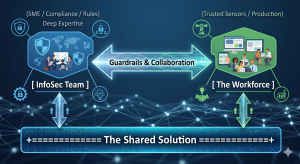
The ultimate goal of Smart Security is to build a high-functioning ecosystem that leverages distributed intelligence. By pairing the technical expertise of the security team with the operational context of the workforce, you create a powerful symbiosis.

InfoSec understands the threat landscape, regulations (ISO, NIST, SOC2, …), and system vulnerabilities. The users understand how the business actually functions, what clients require, and where the operational bottlenecks sit. When these two forces work in conjunction, they discover viable solutions that satisfy compliance while maintaining production velocity.

Crucially, this model transforms employees into trusted sensors and early detectors.
No automated Endpoint Detection and Response (EDR) software or AI-driven email filter is flawless.
The ultimate line of defense against sophisticated social engineering or a targeted Business Email Compromise (BEC) is a human who notices that something is “off.”

If an employee feels valued and supported by InfoSec, they will instantly flag a suspicious event, but if they operate in a culture of fear, resentment, or high friction, they will stay silent, or blindly click through authentication prompts just to clear their screens.

5. Gamifying the Culture: The InfoSec Challenger

How do you bring this philosophy to life?

You take security awareness out of the realm of boring, punitive, check-the-box compliance compliance training and turn it into a transparent, gamified corporate sport.

Instead of deploying trick phishing simulations designed to catch employees out and sentence them to mandatory training videos, flip the paradigm entirely – Challenge the workforce to catch the InfoSec team out.

By launching a monthly “IT InfoSec Challenger of the Month” initiative, you incentivize proactive vigilance through friendly competition:

  • The Scope: Staff members earn points and recognition for providing valuable security insights, flagging emerging industry threat vectors, identifying an operational vulnerability, or spotting a live configuration error in an internal corporate application, acting as a collaborative and willing extension to the InfoSec team.

  • The Rewards: The prizes do not need to be massive corporate cash payouts. In organizational psychology, status and micro-rewards drive higher engagement. A bottle of bubbly, a digital badge on the companywide corporate newsletter, a small desk trophy, or a dinner voucher for two with their plus-one creates highly coveted bragging rights and a personal reward with recognition that stays with them.

This framework creates a no-lose scenario for the enterprise. If staff members successfully catch a blind spot or process vulnerability, InfoSec wins because they can patch the flaw before a malicious actor exploits it.
If the staff fails to find a vulnerability but stays actively engaged trying to do so, InfoSec still wins because the baseline vigilance of the entire company skyrockets.

When a member of the accounting or operations team wins the award, security ceases to be an abstract corporate policy – It becomes a badge of honor celebrated among peers.

The Bottom Line

A business exists to generate value, serve its clients, and ship production.

The Infosec function exists to ensure the business survives to keep doing so, and if security throttles production to zero or just becomes the “No”,it fails its primary objective.

The core of leadership boils down to a simple mandate:
Allow people to do their jobs with minimum friction, and make it as safe as we possibly can.

By treating your workforce as trusted partners, designing workflows around human behavior, and gamifying vigilance, you dismantle the legacy friction that compromises modern enterprises, and you stop being seen as the enemy and disabler and instead, you become a core pillar of operational excellence and a practical partner.

That is part of how you build a resilient, secure, and highly profitable enterprise.


Posted on

Thoughts on software project sizes – or the pain of scaling.

Thoughts of the Fractional ChiefLines of Code aren’t a quality metric, but they are a cognitive one.

As a codebase grows, the limiting factor isn’t performance or tooling – it’s how much of the system a human can realistically hold in their head.

Past certain size thresholds, individual understanding gives way to structural knowledge, tooling reliance, and eventually team coordination, and this is where documentation, standards, and deliberate technical debt management stop being “nice to have” and become survival requirements.

Ignore this, and critical system knowledge quietly walks out the door one day – possibly for the last time.


While the mythical “LOC” is not an absolute in any way, it is still a usable measure to roughly estimate the complexity and size of a project and by this what you  may need or be able to do with the resources you have. 

The scale of an application, and as echoed by most programmers as a rough measure, is the amount of lines of code one can keep in their head effectively and how much of the “big picture” you start to lose as the code size increases.

This is what I have found to be rough guidelines over time, and while it is my personal perception and a lot of programmers tend to concur, but  may individually have their own varying standards:

  • Tiny – 1,000 lines or less.
    • “Trivial” or a single-problem solution like an individual automation.
    • Easy to keep every tiny detail and every line in your head and know exactly where it is.

  • Small – 1,000-5,000 lines.
    • You know the details of individual modules and functions and within a line range of where to locate a particular set of functionality with ease.
    • You still have deep knowledge of the bulk of the code.
  • Medium – 5,000 to 20,000 lines.
    • You as an individual start losing the detail.
    • You start to focus on the overall structure of the entire project in your head,
      and know roughly what module a particular function exists in and how far in to scroll to find it.
    • You’re only maintaining details of code you’re actively working at this point.
  • Large – 20,000 to 50,000 lines.
    • Detail knowledge is limited to immediate work and everything else is having a birds-eye sense of where stuff is in the code.
    • You’re working off high-level structural knowledge and will start using tools to pinpoint things you’ve forgotten the exact location for.
    • This tends to also be the mental threshold of where an experienced programmer can hold the picture of the entire codebase in their head.

  • Very Large – 50,000 to 250,000+ lines.
    • You’re at multiple team members at this point and you’re treating the codebase as a set of interlocked projects.
    • Coordination for changes is absolutely essential at this point.
    • Only a handful of developers could maintain a complete mental picture of the codebase at this point and would be deep specialists in it having worked on it for years.
    • If this is maintained by a smaller team, or worse, an individual, you need to ensure standards and proper handovers when (not if) people move jobs, where the maintaining experience and knowledge literally walks out of the door every night, and at some point, for the last time. 

Please keep in mind that:

  • These thresholds describe individual cognitive limits, not team or system limits, and that 100k LOC in one tangled domain/monolith is not the same as the same 100k LOC across cleanly separated domains such as that of miniservices (see the article about “when microservices go rogue”).

  • The numbers can be skewed upwards significantly by things like the following (in no specific order)

    • Good coding standards and principles. 
    • Good tools and IDE’s supporting the developers, such as the Jetbrains and similar toolchains.
    • Good specifications. (this is where you start…)
    • Good documentation (Sorry guys – no, code is NOT the documentation – it is the implementation – what you did..)
    • Documentation is what describes in simple terms, how things hang together, used data formats, connectivity, data and service relations, related services etc , and, the intent of what you did – not what you did.
    • Good processes supporting the development coupled with development time frames allowing for the above.
    • Continuously caring about technical debt, setting aside time “decruft” the bad stuff.

(C) (BY) EmberLabs / Chris Sprucefield

Posted on

1PassMapper

Securing Your Development & Deployments with 1PassMapper

Source: https://github.com/emberlabstech/1PassMapper

At EmberLabs®, security has always been at the heart of how we design, build, and deploy software.
One recurring challenge for Dev/DevOps teams is keeping the security of credentials with the practical need for configuration during builds and deployments, while just going about doing their day to day work. 

Far too often, secrets end up hardcoded in Git repositories and code, CI/CD pipelines, or configuration files – creating risks that can later become costly breaches.

This is where 1PassMapper comes in.


Why 1PassMapper?

Modern development teams rely heavily on automation.
Whether you’re deploying Docker containers, Kubernetes workloads, or traditional servers, there is always a need to inject API keys, database passwords, and certificates at “runtime” or build of deployment.

The problem:

  • You want to keep your configuration templates versioned in Git.

  • You do not want to commit sensitive credentials.

  • You want to maintain credentials and settings in a single location, but used in many locations – Single update.
  • When credentials (or other data) rotate, you need builds to automatically reflect those changes.

  • You may need different credentials for different environments without duplicating templates.

1PassMapper solves this by bridging your templates and secure vaults (like 1Password).


How It Works

1PassMapper allows you to:

  • Define your configuration files as templates (with tags like [[sql.host]]).

  • Store credentials in a JSON object either locally or inside a 1Password vault item.

  • Automatically map placeholders in your templates to the correct secret or configuration values during your build process.

This means your Git repository contains only clean templates with placeholders, while the real secrets live securely in 1Password.

Example:

Template (sample-template.json):

{
    "item1": "[[sql.host]]",
    "item2": "[[sql.user]]",
    "item3": "[[sql.pass]]",
    "item4": "[[host.domain]]",
    "item5": "[[cred.UNKNOWN]]"
}
Credentials (in 1Password or a local JSON file):
{
  "sql": {
    "host": "some.domain",
    "port": "3306",
    "user": "root",
    "pass": "someAwesomePassword"
  },
  "host": {
    "domain": "myCoolDomain.com",
    "port": "443",
    "certKey": "certificate.key",
    "cert": "certificate.pem",
    "certpass": "myKeyPassword"
  }
Practical example – build from 1Password CICD/MySecretItem, 
1PassMapper -in sample-template.json -out config.json -vault CICD -item MySecretItem
or, using a local file:
1PassMapper -injson sampleJsonCreds.json -in sample-template.json -out config.json

Build output (config.json):

{
    "item1": "some.domain",
    "item2": "root",
    "item3": "someAwesomePassword",
    "item4": "myCoolDomain.com",
    "item5": "[[cred.UNKNOWN]]"
}
Your secrets never touch Git, and you can freely reuse the same template across environments.

Security Benefits

  • Eliminates hard-coded secrets from Git, Code in general, and possibly Docker images.

  • Centralizes credential storage in 1Password with audit trails and rotation policies.

  • Supports environment isolation (dev, staging, prod) with the same templates, using the Makefile or similar, to determine the template used.

  • Provides consistency across local builds and CI/CD pipelines, by using the same key for common items. 


Development Benefits

  • Less hassle: new developers pull templates without worrying about leaking secrets.
    Just map a key to a secret – it’s reusable!

  • Deduplication: Provides a way to use values, provided by by namespaces, leading to less duplication.
  • Flexibility: supports Json, Yaml, or any other textbased configuration formats, including code. 

  • Resilient pipelines: secrets update automatically when rotated in 1Password.

  • Portability: build in the cloud or locally with the same tooling.


Why EmberLabs® Built This

At EmberLabs®, we wanted a solution that was:

  • Lightweight and developer-friendly.

  • Flexible enough to handle multiple environments.

  • Strongly aligned with secure-by-design principles.

With 1PassMapper, we created a tool that is fast and simple, and integrates seamlessly into existing DevOps workflows,
with the aim to give teams confidence that their deployments are both secure and repeatable, and offers a way to reduce
configuration duplication as an added bonus. 


Summing it up.

In 2025, development speed can’t come at the cost of security. Seriously.
With 1PassMapper, teams can have both: secure credential management and streamlined deployments.

If your organization struggles with keeping secrets safe while maintaining efficient builds, this approach may change how you think about DevSecOps practices.

🔒 Secure your pipelines.
⚡ Accelerate your workflows.
✅ Standardize your deployments.

© EmberLabs® (BY-SA)

Enjoy!