
Author: chris
Handling gaps in Your CV as a contractor or self-employed professional
 TL;DR:
Register a trading name (and TM), use it as your employer on your CV, describe your roles, and treat clients as projects, not jobs.
This provides a seamless, professional timeline—no gaps, and full legitimacy.
The longer reasoned version…
If you are looking for a new position, gaps in your CV can raise questions, especially if you work as a contractor or are self-employed.
Here’s a practical approach, that can solve these issues, and provide a solid timeline.
-
Register a Trading Name:
Even as a sole trader, register a trading name for your business. In most countries, this is inexpensive and can also be registered as a trademark (™), giving your business added credibility. Just choose the trading name you want to work with, and typically, within EU, a national registration is ~100 euro.
This also gives you a VERY strong legal protection for your trading name, and you can prevent others from using it in your class.
It is even stronger protection than registering a busines name with the companies house…
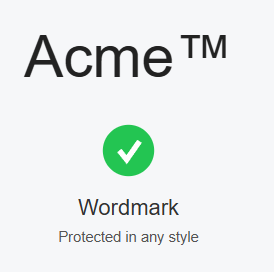
Also, register this as a “wordmark” for maximum protection, as this enables you to incorporate the name in any graphical setting, as otherwise, a trademark would be linked and limited to the specific graphical representation that has been registered, as a wordmark allows you to use it in ANY graphical, logo or font setting, as it is the “word” itself that is protected, not how it is represented. -
Trade Under Your Registered Name:
Conduct all your business activity using your trading name.
Use this name consistently on all invoices, contracts, and professional correspondence. -
Present Your Trading Name as Your Employer:
On your CV, list your trading name (and TM, if registered) as your employer.
Your self-employment under your own company or trading name is a perfectly valid and legal form of employment, and way of representing yourself on the market. -
List Roles, Not Clients:
Instead of listing each client as a separate employer, describe your roles and responsibilities under your trading name, and optionally mention key clients or projects as examples.
This creates a single, continuous timeline of employment and avoids unexplained gaps.
Example:
| Period | Employer | Role | Details |
|---|---|---|---|
| 2015–Present | ACME Consulting™ | Owner/Consultant | Provided IT consulting to various clients… [list of clients, and summary types of work / roles for the clients] |
The benefits?
-
Ensures a consistent work history with no unexplained gaps.
-
Enhances professional image with a registered TM.
-
Allows you to maintain confidentiality about clients if needed.
-
Factually correct: Self-employment under a trading name is a legal form of employment.
-
Common practice: Many experienced contractors use this method to avoid the appearance of gaps.
-
Protects client confidentiality and avoids cluttering the CV with short stints.
-
Removes bias – Employers often hesitate if they see gaps or too many short contracts; this format presents stable, ongoing work.
Possible caveats?
-
Some HR may request clarification about what you did for that period—be ready with a project/client list if asked.
Any non-client periods, can be explained as self-investment in training, working on internal products and otherwise. -
In some industries (e.g., government, finance), disclosure of clients may still be required at later stages.
This is technically not a problem, and you would have the invoicing and other items to show, as well as self-investment as cover for gaps.
Good luck!
Dwejra – Gozo’s inland lake
Views from Żebbuġ
Another step on the road.
 I got the A1-A3 and A2 drone license.
(and I’m not stopping there…)
Got around to doing the second part, going for the A2, and if you are thinking of getting your drone training and license, take a look here:
https://www.dronelicense.eu/
Very good and effective training material, allowing you to work at your own pace, and most importantly,
get there, and get properly licensed across EU.
- It’s formal,
- It’s real,
- It’s official.
- It’s valid across all of EU.
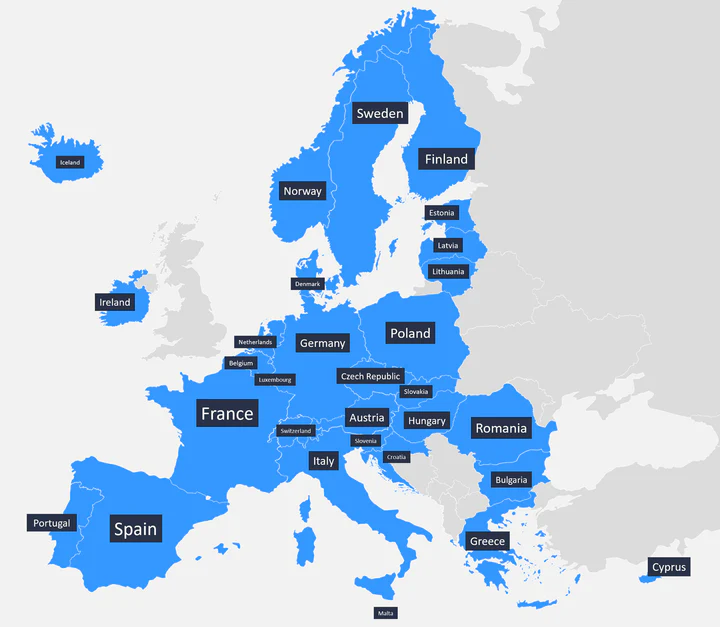
(please note that you will need to register as a pilot in at least one EU country, and some require individual national registrations)
Ok, ok… so what are the rules?!
You can effectively sum it up as:
- A1: fly over people but not over assemblies of people
- A2: fly close to people
- A3: fly far from people (heavyweight drones are limiting this)
This is a EASA (European Aviation Safety Agency) summary of drone classes and rules.

EASA information:
https://www.easa.europa.eu/en/domains/drones-air-mobility/operating-drone/open-category-low-risk-civil-drones
Things are growing in Gozo!
A beautiful day on the beach!
Contractor vs Employee?
 Consultants/Contractors vs Employee – A side by side comparison
Which one? Or both?
A seemingly never-ending and long-standing dilemma for many decision-makers and businesses is whether to use employees or consultants/contractors (hereafter, contractors).
When choosing between contractors and employees, it’s a common perception that contractors are for short-term and employees are for long-term commitments, and contractors are very expensive, but this does not generally hold true as of today.
In either case, one needs to consider real factors like flexibility, cost-effectiveness, and specialized expertise. Contractors offer targeted skills ideal for equally short-term specific projects without long-term commitments, or general long-term commitments and continuity, if properly managed by the provider, while employees has the ability to bring continuity and deeper integration into your organization’s culture. It is all down to what your priorities and goals are.
Shifting preferences.
Also, in today’s world, the sentiment of many highly skilled and professional workers have shifted a lot as of recent years, with them becoming contractors rather than employeers, and being a contractor have become a new common form of employment, offering a greater flexibility as seen to the business side of things, and one that can equally come to become a longer term part of the business with an equal level of commitment, if done right.
The longevity of commitment claim is especially at stake here, as it is today common for employees to change jobs in the range of every two to four years, sometimes more often, negating the long-term engagement claim, and price-wise, there is not much of a realistic difference between the two anymore.
The net result of this, speaks in favor of the contractor, not just purely from the business perspective.
Side by side:
Take a look at these two quick summaries, side-by-side examples on comparable levels:
| Contractor/Consultant Contractor: 550/day over 44 weeks. No additional costs of:
Benefits (their selling points)
|
Employee Permanent employee: 75K salary over 44 weeks. Additional costs to consider:
Other types of common costs (benefits) include (estimates per year):
Office space average cost across EU p/a and employee: €7500 (range: 3.9-15k/y) |
| Total: 550/day for 44 weeks – €121K | Total Year 1: €121 – €148K (€134.5k) Total Year 2+: €108 – €135k (€121.5k) |
Today, and so far in this comparison, it is pretty much like-for-like, cost-wise, but with added benefits for both parties, but it does not stop there.
The contractor, in greater self-governance, albeit at somewhat greater risks and contractual committments, and for the business, it’s a more well-defined commitment with a known entity and lesser set of risks in cases of non-performance and similar issues.
The hidden costs:
Additionally, there are likely considerable company overheads in HR, Legal, and compliance due to the costs required to maintain employee records, manage disputes management, conduct reviews, provide training, and many other functions. These are commonly not required for contractors, due to their contractual self-governance.
It doesn’t stop there, as for the staff, the business usually has other overheads not covered in the above, such as parking, office space, heating, energy, office supplies and additional factors that needs to be added to the costs of the employee, which for the contractor is mainly or wholly covered by themselves at their own expense. The cost of this has been summarized above as a range, and is based on 15sqm/employee and year, as an average across EU, for both cowork and outright rented spaces.
As for the longevity and company culture, the relatively small cost of including contractors to company events, parties, etc, will be greatly outweighed by the benefits, and still be a tax-deductible, as it is now supplier entertainment. One just needs to be careful about the anti-bribery regulations.
As you can see, after the first year, contractors and employees are on par or cheaper, without the loss of productivity or protection for your business, and in the end, with all things considered, it is a win-win situation for both parties, business and contractor, offering the greater flexibility.
Summary:
If you take all of the hidden business overheads as listed above into account, you will likely soon see that the contractor is actually the cheaper option overall, with the same or greater business benefits.
The primary question now comes down to:
- Are you willing to have consultants and allow them to work remotely?
- Are you willing to trust the people you hired to work for you, to do their job?
If the answer is yes, then, you have just widened your recruitment basis and access to qualified staff.
CICD – passwords and settings to config?
 … and keeping them out of the code in GIT?
Let’s say you have a larger config file with a pile of items that you want to fill in while deploying, but don’t want to keep in git, such as settings or credentials?
At the same time, you want to test things while developing, without having to set up credentials etc all the time, copying files in and out, or quickly configure things for deploying / testing against different targets..
This obviously does not take away from the use of live secret management,
such as aws secrets manager and others, but is suitable for more “static” solutions,
or fundamental configurations required for base setups.
For the local shell, add the following to your .bashrc or similar:
alias 1passlogin="eval \$(op signin)"
Pre-requisites;
- 1Password command line CLI agent. ( https://1password.com/downloads/command-line )
- jq (the json parser)
Steps:
- Create a new vault in the 1Password, like “CICD”
- Create the item, and name it as you please, no spaces in the name, like.. “app-config”.
- In the item, say a secure note called ‘general-creds’ , create a field and name it “json”.
- In this json field, store the json as an array of key/value sets, like this:
{ "cred": [ { "key_1": "value 1" }, { "key_2": "value 2" }, .... and so on. } } - and this shellscript;
#!/usr/bin/env bash ROOT="$(dirname "$(realpath "$0")")" # Check if the required arguments are provided if [ "$#" -ne 2 ]; then echo "Usage: $0 <1pass vault/item> <template_file>" exit 1 fi # Read the JSON file and template file path="$1" template_file="$2" # Get the credentials from the 1Password op read "op://${path}/json" > 1p-credfile.json # Validate that the JSON file exists if [ ! -f "1p-credfile.json" ]; then echo "Error: JSON file '1p-credfile.json' does not exist." exit 1 fi # Validate that the template file exists if [ ! -f "$template_file" ]; then echo "Error: Template file '$template_file' does not exist." exit 1 fi # Read the JSON content and template content from the files json="$(cat "1p-credfile.json")" template="$(cat "$ROOT/$template_file")" # Use jq to traverse the JSON array and replace placeholders result=$(echo "$json" | jq -r --arg template "$template" ' reduce .cred[] as $item ($template; reduce ($item | to_entries[]) as $kv (.; gsub("\\[\\[" + $kv.key + "\\]\\]"; $kv.value)) ) ') # Output the replaced string echo "$result" # Clean up after ourselves. if [ -e 1p-credfile.json ] ; then rm -f 1p-credfile.json ; fi - .. and a config template file (or other file), like this, inserting the key names in double hard brackets, such as [[keyname]]
{
   "configValue1": "[[key_1]]",
   "configValue2": "[[key_2]]"
}
Putting it all to work…
In your Makefile or similar, use the script as:
./MapCreds-onepass.sh “<vault>/<item>” “<source_file>” > “<target_file>”
Example:
./MapCreds-onepass.sh CICD/app-config config-template.json > config.json
and the output – config.json, would become ;
{
   "configValue1": "value 1",
   "configValue2": "value 2"
}
… just don’t forget to mark the resulting “config.json” as an exluded file in git!
(and obviously, this would work on other text files as well, including source code for replacing values / settings having the source in 1pass.)
Njoy!